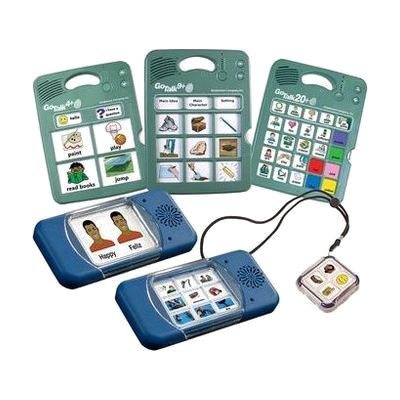
GoTalk Multi-Message Bundle
by AbleNet
Price is what the vendor listed when last checked. Confirm it with the vendor before buying.
Last verified September 16, 2026 · classified April 26, 2026
What it is
Summary
AI-generated from vendor-published content · April 26, 2026
This bundle brings together four GoTalk AAC devices in one purchase: the GoTalk 4+ Lite Touch, 9+ Lite Touch, 20+ Lite Touch, and GoTalk Duo — each a standalone speech-output communicator that plays pre-recorded messages when picture symbol buttons are pressed. The range is designed for people who use aided communication to express wants, needs, and ideas, covering everything from a two-message device for someone just starting out to a 100-message, multi-level device for someone with a larger vocabulary. Each device arrives ready to record and use once you've printed or drawn symbol overlays and recorded the spoken messages — no app or computer required, though free companion software is available for creating overlays. The tradeoff with a bundle like this is cost efficiency versus fit: you may end up with devices that don't match the user's current or near-future needs, so it's worth involving a speech-language pathologist to identify which device in the set is actually the right starting point.
Quick Facts Catalog facts · auto-generated
- AT Act lending
- Medicaid waiver
- Out of pocket
- School district
- Vocational rehab
What Setup Looks Like
- Out of the box
- Insert batteries into each device.
- Press the record button and speak a message to assign it to a key — playback is instant.
- With a guide
- Download the GoTalk overlay software or use the printable templates to create picture symbol overlays for each device.
- Record messages level by level, matching each overlay to the appropriate level on the device.
- Allow 30–60 minutes per device for initial overlay creation and message recording. See manufacturer support resources for detailed instructions.
- With professional help
- A speech-language pathologist (SLP) should assess which GoTalk model best fits the user's current communication level and motor access needs.
- An SLP or AAC specialist can select appropriate vocabulary, design overlay layouts, and establish a teaching plan for building independent use across settings.
Getting it
Try Before You Buy
Devices like this are often available to borrow through your state's AT Act program — typically free or low-cost — so you can try it before buying or pursuing funding.
Where to Get It
This is the vendor WhatCanHelp tracks for this product — it may also be available from other retailers or a local supplier, and prices vary.
Some links may be affiliate links — WhatCanHelp may earn a small commission from purchases at no extra cost to you. More on affiliates →
As an Amazon Associate we earn from qualifying purchases.
How to Fund This
Equipment like this is often pursued through official state programs. These are common starting points — each program decides its own eligibility and what it covers, so the first step is always a phone call.
Compare & explore
Sources & fine print
Vendor facts (name, price, platforms, vendor link) sourced from AbleNet — view on vendor site; last verified September 16, 2026.
Classification & description AI-generated from vendor-published content on April 26, 2026 · confidence: high. Vendor specs may lag; verify before relying on details in a clinical or funding artifact.