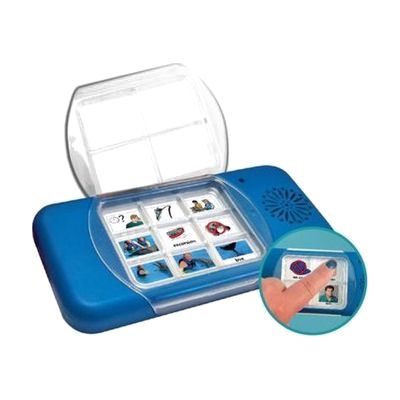
Go Talk Fit
Price is what the vendor listed when last checked. Confirm it with the vendor before buying.
Last verified September 18, 2026 · classified April 26, 2026
What it is
Summary
AI-generated from vendor-published content · April 26, 2026
The Go Talk Fit is a compact, handheld voice output communicator that lets users record and play back short spoken messages across multiple levels — either 4 or 9 message squares, with up to 3 levels each, giving a total of 12 or 27 stored messages. It's designed for someone who needs a portable, durable way to communicate basic wants, needs, or social phrases while out in the community — shopping, at appointments, or in school. This is a complete, standalone device: record messages, attach symbol overlays, and it's ready to use — no app, no phone, no computer required. The tradeoff is limited message storage compared to more expensive SGDs, and vocabulary changes require re-recording, so it works best for people with a stable, predictable set of communication needs.
Quick Facts Catalog facts · auto-generated
- AT Act lending
- Medicaid waiver
- Out of pocket
- School district
- Vocational rehab
What Setup Looks Like
- Out of the box
- Flip the on/off switch to power on the device.
- Press and hold a message square to record a spoken message into it.
- Press the same square briefly to play back the message — repeat for each cell across each color-coded level.
- With a guide
- Plan vocabulary for each level (e.g., Level 1 = greetings, Level 2 = requests) before recording.
- Create or print symbol overlays and attach them to the corresponding message squares.
- Test all messages in context with the user and re-record any that need adjustment — expect 30–60 minutes for a complete initial setup.
- See Attainment Company support resources for overlay templates and detailed instructions.
- With professional help
- An SLP or AT specialist can assess whether a 4- or 9-message layout is appropriate and select vocabulary matched to the user's daily communication contexts.
- A professional can also determine if this device is a stepping stone toward a more robust AAC system — typically assessed in 1–2 sessions.
Getting it
Try Before You Buy
Devices like this are often available to borrow through your state's AT Act program — typically free or low-cost — so you can try it before buying or pursuing funding.
Where to Get It
This is the vendor WhatCanHelp tracks for this product — it may also be available from other retailers or a local supplier, and prices vary.
Some links may be affiliate links — WhatCanHelp may earn a small commission from purchases at no extra cost to you. More on affiliates →
As an Amazon Associate we earn from qualifying purchases.
How to Fund This
Equipment like this is often pursued through official state programs. These are common starting points — each program decides its own eligibility and what it covers, so the first step is always a phone call.
Compare & explore
Sources & fine print
Vendor facts (name, price, platforms, vendor link) sourced from Attainment Company — view on vendor site; last verified September 18, 2026.
Classification & description AI-generated from vendor-published content on April 26, 2026 · confidence: high. Vendor specs may lag; verify before relying on details in a clinical or funding artifact.