Browse Assistive Technology
Products
-
ChromeVox
Free
ChromeVox is the screen reader built into ChromeOS. It reads what is on a Chromebook screen out loud, so someone who can't see the display well can still move through apps, menus, and web pages. It comes with the Chromebook, so there is nothing to buy or install. Chromebook accessibility settings can sync across your devices when you sign in to your Google Account, which saves you from setting them up again on a new machine or after a reset. The page for this product mostly covers Chromebook accessibility settings in general, so check the ChromeVox help pages for the exact keyboard commands and options.
Verified 3 days agoSetup with instructions -
Blue2 FT
$260.00
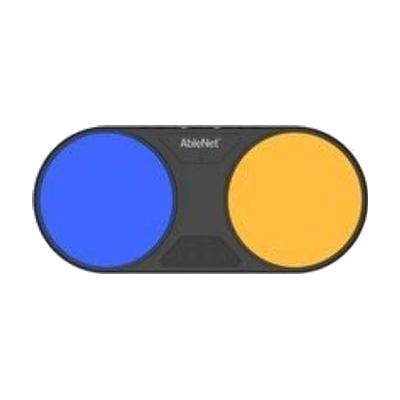
The Blue2 FT is a wireless Bluetooth switch that activates when you touch it or bring a hand close to it, so no hard press is needed. It gives sound and light feedback when it triggers. It can control an iPad or iPhone through Switch Control, and it also works with Windows, Mac, and Chromebook software that responds to keyboard keys like space, enter, or 1 through 4. It has two jacks for plugging in extra switches, such as a Jelly Bean or Big Red, and the built-in sensors turn off automatically when an external switch is connected. It has a rechargeable battery and threaded inserts for mounting. Setting up the right access method, position, and software takes some trial and error, so this is best chosen with someone who knows switch access.
Verified 4 days agoProfessional guidance helps -
Plug and Play USB Switch
Est. $60–$130
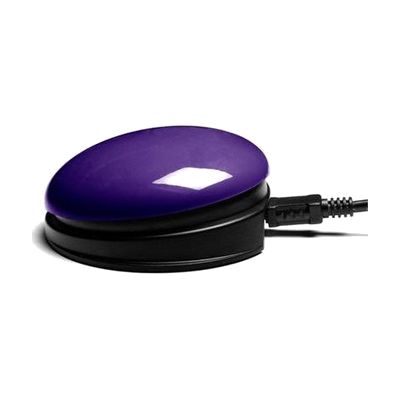
This switch has a 75mm pressing surface and a USB connection built in, so it plugs straight into a PC, Mac, or Chromebook with no separate switch interface or driver. It also has two 3.5mm sockets for connecting extra switches, and a small LED display on the device lets you choose what each switch does. Advanced settings can be adjusted for people whose movements are affected by tremor, ataxia, or chorea. It's a good fit for someone who needs a simple way to press a button instead of using a keyboard or mouse, and it can be fixed in place using the Small Inclusive Mounting Plate with Velcro. The switch only sends input, so the software or activity it controls is something you'll need to set up separately.
Verified 4 days agoProfessional guidance helps -
Helperbird
Free plan · paid up to $35 every year
Helperbird is a browser extension that adds reading and writing supports to the websites and documents you already use. It can read text aloud, switch pages to dyslexia-friendly fonts like OpenDyslexic and Lexend, lay a color overlay over the screen, and show a reading ruler to keep your place on the line. For writing, it offers voice typing with word prediction, and a screenshot reader that can read text out of an image. It runs in Chrome, Firefox, Edge and Safari, on Chromebooks, on iPad and iPhone, and as add-ons for Google Docs, Slides and Sheets. The everyday tools are free, and a paid Pro plan adds more for individuals, so check which features you need before deciding.
Verified 4 days agoSetup with instructions -
Select-to-speak for Chromebook
Free
Select-to-speak is a text-to-speech tool built into every Chromebook. You pick the text you want, and the Chromebook reads it aloud while highlighting each word as it goes. You can shade the rest of the screen to help your eyes stay on the words, pause the reading, skip lines, and change the speed. It also lets you choose the voice and language, so it works for someone who finds reading on screen tiring or who learns better by listening as well as seeing the words. It only works on a Chromebook, so it won't help on other kinds of computers.
Verified 4 days agoSetup with instructions