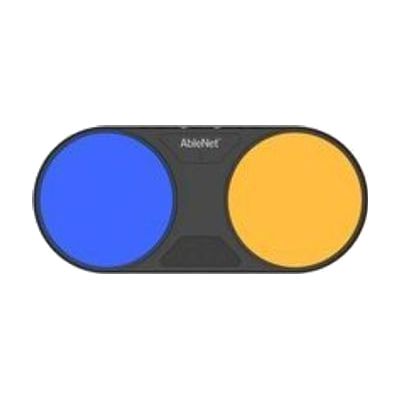
Blue2 FT
by AbleNet
Price is what the vendor listed when last checked. Confirm it with the vendor before buying.
Last verified September 17, 2026 · classified April 26, 2026
What it is
Summary
AI-generated from vendor-published content · April 26, 2026
The Blue2 FT is a Bluetooth switch interface that connects wirelessly to iPads, iPhones, Windows, macOS, and Chromebook devices, letting users control them through proximity or touch activation rather than a standard keyboard or touchscreen. It's designed for people who have limited hand control and need to operate switch-accessible software — including communication apps, educational software, and device navigation — through one or two switch activations. The device ships pre-programmed for common keyboard commands and includes two external jacks so you can plug in a separate physical switch (like a Big Red or Jelly Bean) if the built-in proximity sensors aren't the right fit. One important thing to know: this is a switch interface, not a switch itself — it's one piece of a larger access setup, and getting the most out of it typically requires working with an occupational therapist or ATP to configure scanning settings and integrate it with the person's specific software and device.
Quick Facts Catalog facts · auto-generated
- AT Act lending
- Medicaid waiver
- Out of pocket
- School district
- Vocational rehab
What Setup Looks Like
- Out of the box
Charge via USB, power on, and pair to your iOS or computer device via Bluetooth — the device connects and responds to proximity within minutes for basic testing. - With a guide
- Enable Switch Control (iOS) or equivalent scanning access on the target device.
- Plug in any external switches to the two 3.5mm jacks if the built-in proximity sensor is not the preferred access method.
- Test activation with target software and adjust scanning speed and switch assignment in device accessibility settings — allow 30–60 minutes for initial configuration. See manufacturer support resources for detailed instructions.
- With professional help
- An occupational therapist (OT) or assistive technology professional (ATP) should assess the user's motor access site and determine the optimal switch placement, activation force, and scanning speed.
- Integration with AAC or educational software may require additional programming sessions — expect 1–3 sessions over 2–4 weeks for a complete, individualized setup.
Getting it
Try Before You Buy
Devices like this are often available to borrow through your state's AT Act program — typically free or low-cost — so you can try it before buying or pursuing funding.
Where to Get It
These are the vendors WhatCanHelp tracks for this product — it may also be available from other retailers or a local supplier, and prices vary.
Some links may be affiliate links — WhatCanHelp may earn a small commission from purchases at no extra cost to you. More on affiliates →
As an Amazon Associate we earn from qualifying purchases.
How to Fund This
Equipment like this is often pursued through official state programs. These are common starting points — each program decides its own eligibility and what it covers, so the first step is always a phone call.
Compare & explore
Sources & fine print
Vendor facts (name, price, platforms, vendor link) sourced from AbleNet — view on vendor site; last verified September 17, 2026.
Classification & description AI-generated from vendor-published content on April 26, 2026 · confidence: high. Vendor specs may lag; verify before relying on details in a clinical or funding artifact.