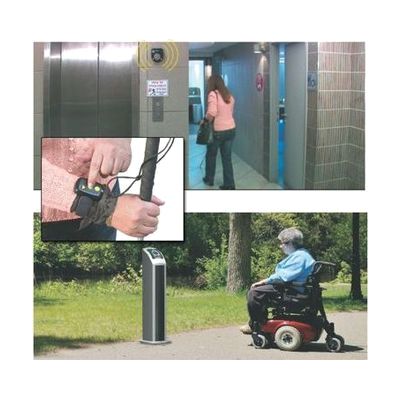
STEP-HEAR Navigation System for the Blind
by Step-Hear
Last verified July 29, 2026 · classified April 26, 2026
What it is
Summary
AI-generated from vendor-published content · April 26, 2026
This is a two-part proximity-based navigation aid: a fixed base unit installed at key locations (entrances, hazards, transit stops) that stores up to one minute of spoken directions or information, and a small handheld activator carried by the user that vibrates when within about 12 feet of a base unit. The user presses a button on the activator to trigger the recorded audio from the base, which helps orient them to their surroundings. It's designed for blind and low-vision individuals navigating unfamiliar or complex environments — public buildings, transit stations, stores, or campuses — where printed or visual signage is inaccessible. This is a complete system (base and activator included), but meaningful use depends on whoever manages the installation location recording accurate, useful audio content. At under $100, this is an entry-level system — coverage is limited to a 12-foot radius per base unit, so thorough coverage of a large facility would require multiple units at additional cost.
Quick Facts Catalog facts · auto-generated
- AT Act lending
- Out of pocket
- Vocational rehab
What Setup Looks Like
- Out of the box
- Carry the activator — it vibrates automatically when you walk within 12 feet of an installed base unit.
- Press the activator button to hear the recorded audio from the nearby base.
- With a guide
- Mount the base unit at the target location (wall, post, or surface — hardware required).
- Record up to one minute of orientation or safety information into the base unit's digital memory using the operator interface.
- Test activator range and audio clarity from multiple approach angles before finalizing placement.
- Full setup for a single location typically takes under 30 minutes. See manufacturer support resources for detailed instructions.
Getting it
Try Before You Buy
Devices like this are often available to borrow through your state's AT Act program — typically free or low-cost — so you can try it before buying or pursuing funding.
Where to Get It
This is the vendor WhatCanHelp tracks for this product — it may also be available from other retailers or a local supplier, and prices vary.
Some links may be affiliate links — WhatCanHelp may earn a small commission from purchases at no extra cost to you. More on affiliates →
As an Amazon Associate we earn from qualifying purchases.
How to Fund This
Equipment like this is often pursued through official state programs. These are common starting points — each program decides its own eligibility and what it covers, so the first step is always a phone call.
Compare & explore
Sources & fine print
Vendor facts (name, price, platforms, vendor link) sourced from Step-Hear — view on vendor site; last verified July 29, 2026.
Classification & description AI-generated from vendor-published content on April 26, 2026 · confidence: medium. Vendor specs may lag; verify before relying on details in a clinical or funding artifact.