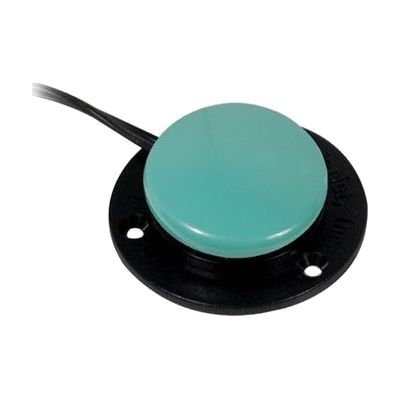
Switches - Specs -Green
by AbleNet
Price is what the vendor listed when last checked. Confirm it with the vendor before buying.
Last verified September 18, 2026 · classified April 26, 2026
What it is
Summary
AI-generated from vendor-published content · April 26, 2026
The Specs Switch is AbleNet's smallest switch in their lineup, with an activation surface just 1⅜ inches in diameter — about the size of a large coin — making it ideal for users who have very precise but limited movement, such as a single finger or thumb press. It's designed for someone who doesn't have the range of motion needed for a larger switch but can reliably activate a small target consistently. The switch connects to any standard 3.5mm switch jack (the same port used by most AAC devices, switch-adapted toys, and computer switch interfaces) via a 6-foot cord, and provides audible click feedback so the user knows each activation registered. This is the switch only — you'll also need a compatible switch-accessible device or interface to actually use it — and the three interchangeable mounting bases help with positioning, though getting the placement right for a specific user typically benefits from guidance from an OT or ATP.
Quick Facts Catalog facts · auto-generated
- AT Act lending
- Medicaid waiver
- Out of pocket
- School district
- Vocational rehab
What Setup Looks Like
- Out of the box
Plug the 3.5mm cord into a compatible switch-accessible device — the switch activates that device when pressed. - With a guide
- Select which of the three detachable bases best suits the user's access position (table mount, angled, flat).
- Position the switch within the user's reliable range of motion and test activation before finalizing placement — allow 15–30 minutes for initial positioning trials.
- With professional help
- An occupational therapist (OT) or assistive technology professional (ATP) should assess the user's motor control to confirm the Specs is the right size switch (vs. Jelly Bean or Big Red).
- Mounting and positioning for consistent, fatigue-free access typically requires 1–2 sessions. See manufacturer support resources for detailed instructions.
Getting it
Try Before You Buy
Devices like this are often available to borrow through your state's AT Act program — typically free or low-cost — so you can try it before buying or pursuing funding.
Where to Get It
This is the vendor WhatCanHelp tracks for this product — it may also be available from other retailers or a local supplier, and prices vary.
Some links may be affiliate links — WhatCanHelp may earn a small commission from purchases at no extra cost to you. More on affiliates →
As an Amazon Associate we earn from qualifying purchases.
How to Fund This
Equipment like this is often pursued through official state programs. These are common starting points — each program decides its own eligibility and what it covers, so the first step is always a phone call.
Compare & explore
Sources & fine print
Vendor facts (name, price, platforms, vendor link) sourced from AbleNet — view on vendor site; last verified September 18, 2026.
Classification & description AI-generated from vendor-published content on April 26, 2026 · confidence: high. Vendor specs may lag; verify before relying on details in a clinical or funding artifact.