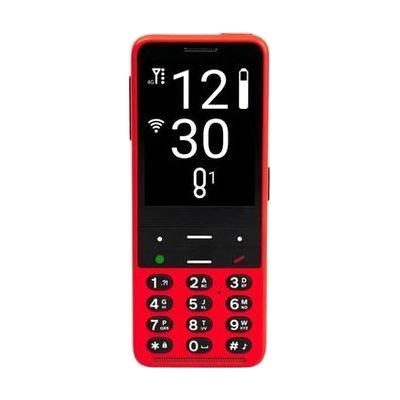
BlindShell Classic 2 - Cardinal Red
by BlindShell
$529.00 ▲ $29.01 (6%)
Price is what the vendor listed when last checked. Confirm it with the vendor before buying.
Last verified September 18, 2026 · classified April 26, 2026
What it is
Summary
AI-generated from vendor-published content · April 26, 2026
The BlindShell Classic 2 is a dedicated accessible cell phone designed from the ground up for blind and low vision users, featuring a tactile keypad with distinct physical buttons, built-in screen reader with voice control, and a simplified menu structure that doesn't require touchscreen navigation. It's aimed at someone who finds standard smartphones inaccessible due to vision loss — including older adults or anyone who finds gesture-based touchscreens unreliable or confusing. The phone comes ready to use as a complete communication device with calling, texting, internet, email, an SOS button, and even a color sensor built in. One significant limitation to know upfront: this version works exclusively on T-Mobile's network in the US, so it won't function on AT&T, Verizon, or other carriers — check coverage in your area before purchasing.
Quick Facts Catalog facts · auto-generated
- AT Act lending
- Out of pocket
- Vocational rehab
What Setup Looks Like
- Out of the box
- Insert a T-Mobile SIM card and power on — the phone's accessible menus are active from first boot.
- Use the tactile keypad and voice prompts to navigate setup steps without sighted assistance.
- With a guide
- Download the BlindShell companion app or consult online documentation to customize voice speed, button functions, and SOS contacts.
- Configure email and internet accounts through the built-in accessible settings menus — allow 30–60 minutes for initial account setup.
- See manufacturer support resources for detailed instructions.
Getting it
Try Before You Buy
Devices like this are often available to borrow through your state's AT Act program — typically free or low-cost — so you can try it before buying or pursuing funding.
Where to Get It
This is the vendor WhatCanHelp tracks for this product — it may also be available from other retailers or a local supplier, and prices vary.
Some links may be affiliate links — WhatCanHelp may earn a small commission from purchases at no extra cost to you. More on affiliates →
As an Amazon Associate we earn from qualifying purchases.
How to Fund This
Equipment like this is often pursued through official state programs. These are common starting points — each program decides its own eligibility and what it covers, so the first step is always a phone call.
Compare & explore
Sources & fine print
Vendor facts (name, price, platforms, vendor link) sourced from BlindShell — view on vendor site; last verified September 18, 2026.
Classification & description AI-generated from vendor-published content on April 26, 2026 · confidence: high. Vendor specs may lag; verify before relying on details in a clinical or funding artifact.