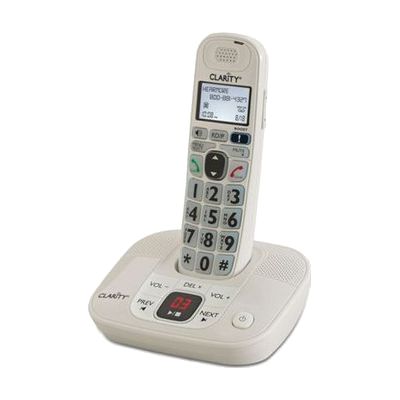
D712 30dB DECT 6.0 Amplified Low Vision Cordless Phone- Answer Machine
by Clarity
Price is what the vendor listed when last checked. Confirm it with the vendor before buying.
What it is
Summary
AI-generated from vendor-published content · October 1, 2026
The D712 is a cordless home phone that makes incoming calls up to 30 decibels louder, about six times louder than a standard phone. It cuts background noise and feedback, and it has four tone settings so you can tune the sound to your hearing. The big, high-contrast keys are backlit for night use, and the caller ID screen uses large type. It also has a built-in answering machine, a speakerphone, 10 speed dial buttons, and a 100-entry phonebook. That makes it a good fit for someone who has trouble hearing callers and also trouble seeing small buttons.
Getting it
Try before you buy
Devices like this are often available to borrow through your state's AT Act program — typically free or low-cost — so you can try it before buying or pursuing funding.
Where to get it
This is the vendor WhatCanHelp tracks for this product — it may also be available from other retailers or a local supplier, and prices vary.
How to fund this
These are common places to ask about paying for equipment like this. Each one decides its own eligibility and what it covers, so start by asking them.
Details
Quick Facts Catalog facts · auto-generated
- Platform
- Complexity
- Ready to use
- Price
- $89.95
- Funding
- AT Act lending
- Medicaid waiver
- Out of pocket
What setup looks like
- Out of the box
- Plug the base into power and a phone jack, and let the handset charge as the instructions describe.
- Pick up the handset, adjust the volume and tone setting to what sounds best, and start making calls.
- Save frequent contacts to the speed dial and memory buttons when you have a few minutes.
Compare & explore
Sources & fine print
Vendor facts (name, price, platforms, vendor link) sourced from MaxiAids — view on vendor site (opens in a new tab); last checked November 2, 2026.
Classification & description AI-generated from vendor-published content on October 1, 2026 · confidence: medium. Vendor specs may lag; verify before relying on details in a clinical or funding artifact.