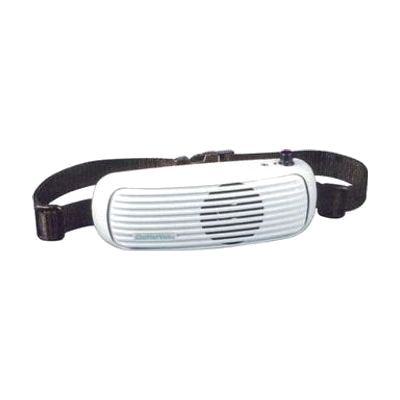
ChatterVOX Voice Amplifier without Microphone
by ChatterVox
Price is what the vendor listed when last checked. Confirm it with the vendor before buying.
Last verified September 18, 2026 · classified April 26, 2026
What it is
Summary
AI-generated from vendor-published content · April 26, 2026
The ChatterVOX is a wearable voice amplifier that boosts a speaker's vocal volume by 12–18 dB, making it audible in classrooms, meetings, or group settings without straining the voice. It's designed for people who have reduced vocal volume due to conditions like Parkinson's disease, laryngitis, post-surgical voice changes, or other speech and neurological conditions — anyone who struggles to be heard reliably in daily interactions. The unit is worn around the waist like a fanny pack on an adjustable nylon band, and this listing includes the amplifier unit, carrying case, charger, and rechargeable batteries — but importantly, no microphone is included, so you'll need to purchase a compatible lapel or headset mic separately before it will function. For a voice amplifier in this category, the absence of a microphone in the box is a significant gap — confirm microphone compatibility before ordering.
Quick Facts Catalog facts · auto-generated
- AT Act lending
- Out of pocket
- Vocational rehab
What Setup Looks Like
- Out of the box
- Charge the unit using the included charger before first use.
- Attach the waistband, connect a compatible microphone (sold separately), and power on to begin amplifying.
- With a guide
- Research and purchase a compatible microphone (lapel or headset style) separately — consult ChatterVox documentation or the vendor for confirmed compatible models.
- Adjust the waistband fit and volume settings to suit the environment — expect 15–30 minutes to dial in comfort and output level. See manufacturer support resources for detailed instructions.
Getting it
Try Before You Buy
Devices like this are often available to borrow through your state's AT Act program — typically free or low-cost — so you can try it before buying or pursuing funding.
Where to Get It
This is the vendor WhatCanHelp tracks for this product — it may also be available from other retailers or a local supplier, and prices vary.
Some links may be affiliate links — WhatCanHelp may earn a small commission from purchases at no extra cost to you. More on affiliates →
As an Amazon Associate we earn from qualifying purchases.
How to Fund This
Equipment like this is often pursued through official state programs. These are common starting points — each program decides its own eligibility and what it covers, so the first step is always a phone call.
Compare & explore
Sources & fine print
Vendor facts (name, price, platforms, vendor link) sourced from ChatterVox — view on vendor site; last verified September 18, 2026.
Classification & description AI-generated from vendor-published content on April 26, 2026 · confidence: high. Vendor specs may lag; verify before relying on details in a clinical or funding artifact.