Flipper TV Remote
by Flipper
Price is what the vendor listed when last checked. Confirm it with the vendor before buying.
What it is
Summary
AI-generated from vendor-published content · October 1, 2026
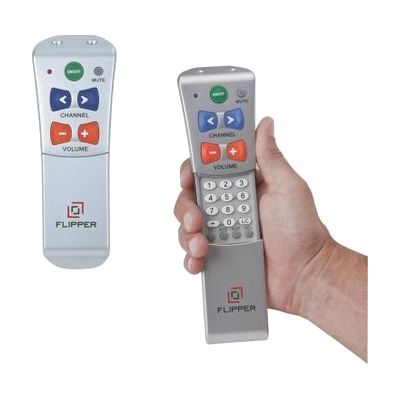
The Flipper TV Remote strips TV control down to six buttons: power, mute, volume up and down, and channel up and down. You can program up to 30 favorite channels, then cover and lock the programming buttons so they can't be pressed by accident. The power button can be set to turn off both the TV and a set top box, so one press does the job. The buttons are color coded, which helps someone with low vision tell them apart. It's a good fit for a person who finds a standard remote confusing or hard to handle, or who needs just a few reliable controls.
Getting it
Try before you buy
Devices like this are often available to borrow through your state's AT Act program — typically free or low-cost — so you can try it before buying or pursuing funding.
Where to get it
This is the vendor WhatCanHelp tracks for this product — it may also be available from other retailers or a local supplier, and prices vary.
Wondering how equipment like this gets paid for? See the official funding programs in your state.
Details
Quick Facts Catalog facts · auto-generated
- Platform
- Age range
- Complexity
- Setup with instructions
- Price
- $39.99
- Funding
- AT Act lending
- Out of pocket
What setup looks like
- Out of the box
Once it's programmed, daily use takes only six buttons: power, mute, volume up and down, and channel up and down. - With a guide
- Put in 2 AAA batteries. They are not included.
- Follow the manual or the video tutorial to program the remote to your TV and, if you use one, your set top box.
- Program your favorite channels, up to 30, then cover and lock the programming buttons. Plan on about 20-30 minutes.
Compare & explore
Sources & fine print
Vendor facts (name, price, platforms, vendor link) sourced from LS&S — view on vendor site (opens in a new tab); last checked November 3, 2026.
Classification & description AI-generated from vendor-published content on October 1, 2026 · confidence: high. Vendor specs may lag; verify before relying on details in a clinical or funding artifact.