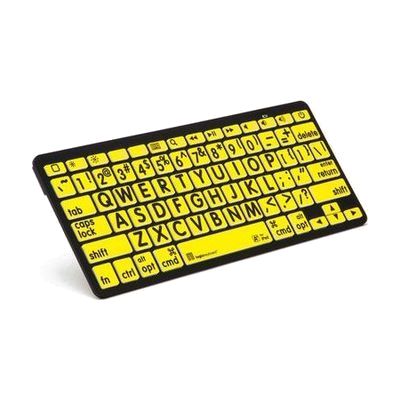
iPad Bluetooth keypad - Yellow Keys Black Letters
by LS&S
Last verified June 18, 2026 · classified April 26, 2026
What it is
Summary
AI-generated from vendor-published content · April 26, 2026
This is a Bluetooth numeric keypad with high-contrast yellow keys and black letters, designed to make iPad, iPhone, and iPod devices more accessible to people with low vision. The large, high-contrast keycaps reduce the need to rely on small on-screen touch targets, which is especially helpful for someone who struggles to read standard device keyboards. At 11 inches wide, it pairs wirelessly via Bluetooth and functions as a physical keyboard input option — no cables required. This is a numeric keypad layout, not a full QWERTY keyboard, so it's best suited for numeric entry or navigation tasks rather than extended text input.
Quick Facts Catalog facts · auto-generated
- AT Act lending
- Out of pocket
- Vocational rehab
What Setup Looks Like
- Out of the box
Turn on the keypad and enable Bluetooth on your iPad, iPhone, or iPod. - With a guide
- Open iPad Settings > Bluetooth and pair the keypad when it appears in the device list.
- Confirm successful pairing and test key input in an app — takes roughly 5–10 minutes. See manufacturer support resources for detailed instructions.
Getting it
Try Before You Buy
Devices like this are often available to borrow through your state's AT Act program — typically free or low-cost — so you can try it before buying or pursuing funding.
Where to Get It
Some links may be affiliate links — WhatCanHelp may earn a small commission from purchases at no extra cost to you. More on affiliates →
As an Amazon Associate we earn from qualifying purchases.
How to Fund This
Equipment like this is often pursued through official state programs. These are common starting points — each program decides its own eligibility and what it covers, so the first step is always a phone call.
Compare & explore
Sources & fine print
Vendor facts (name, price, platforms, vendor link) sourced from LS&S — view on vendor site; last verified June 18, 2026.
Classification & description AI-generated from vendor-published content on April 26, 2026 · confidence: high. Vendor specs may lag; verify before relying on details in a clinical or funding artifact.