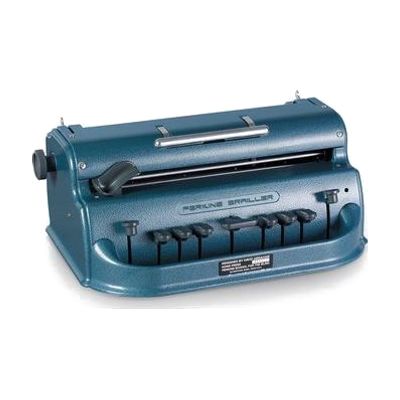
Perkins Classic Brailler with Leather Dust Cover
Price is what the vendor listed when last checked. Confirm it with the vendor before buying.
Last verified September 19, 2026 · classified April 26, 2026
What it is
Summary
AI-generated from vendor-published content · April 26, 2026
The Perkins Classic Brailler is a mechanical typewriter-style device that embosses braille dots directly onto paper using six keys — one for each dot in the braille cell — along with a space bar and backspace. It's designed for blind or low-vision individuals who need to produce hard-copy braille documents, whether for personal use, correspondence, or studying. This is a complete, self-contained mechanical unit: load paper, type, and braille appears immediately — no software, computer, or electricity required. The main practical consideration is size and weight: at nearly 11 pounds, it's a desktop device rather than something you carry around, and 90 lb paper is required to produce readable embossed dots, which means stocking specialty supplies.
Quick Facts Catalog facts · auto-generated
- AT Act lending
- Medicaid waiver
- Out of pocket
- School district
- Vocational rehab
What Setup Looks Like
- Out of the box
- Place the brailler on a flat, stable surface.
- Load paper using the paper guide, adjust margin guides to fit your paper size, and begin typing using the six-key chord keyboard — braille appears on the page immediately.
- With a guide
- Learn the six-key chord system for braille characters — a braille instructor or the included manual can walk through the keyboard layout.
- Practice paper loading, margin adjustment, and line spacing to produce clean, readable output. Expect a few hours of guided practice to develop comfortable typing speed. See manufacturer support resources for detailed instructions.
- With professional help
- A braille literacy specialist or teacher of the visually impaired (TVI) can provide structured instruction in braille code and efficient use of the brailler, particularly for children or new braille learners.
- Expect multiple sessions over several weeks for a new user to achieve functional braille literacy with the device.
Getting it
Try Before You Buy
Devices like this are often available to borrow through your state's AT Act program — typically free or low-cost — so you can try it before buying or pursuing funding.
Where to Get It
This is the vendor WhatCanHelp tracks for this product — it may also be available from other retailers or a local supplier, and prices vary.
Some links may be affiliate links — WhatCanHelp may earn a small commission from purchases at no extra cost to you. More on affiliates →
As an Amazon Associate we earn from qualifying purchases.
How to Fund This
Equipment like this is often pursued through official state programs. These are common starting points — each program decides its own eligibility and what it covers, so the first step is always a phone call.
Compare & explore
Sources & fine print
Vendor facts (name, price, platforms, vendor link) sourced from Perkins Solutions — view on vendor site; last verified September 19, 2026.
Classification & description AI-generated from vendor-published content on April 26, 2026 · confidence: high. Vendor specs may lag; verify before relying on details in a clinical or funding artifact.