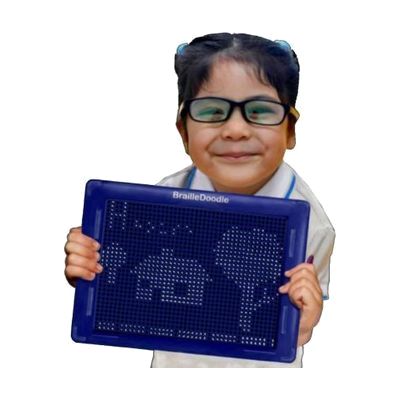
BrailleDoodle Braille Teaching Aid
by The TouchPad Pro Foundation
Price is what the vendor listed when last checked. Confirm it with the vendor before buying.
Last verified September 19, 2026 · classified April 26, 2026
What it is
Summary
AI-generated from vendor-published content · April 26, 2026
The BrailleDoodle is a two-sided tactile tablet that lets users physically raise and erase individual braille dots using magnetic ball bearings and a stylus — no electricity required. One side has structured braille practice areas with pre-arranged cell grids for learning letters, numbers, and sight words; the flip side is a blank grid for creating tactile diagrams, graphs, and drawings. It's aimed at anyone learning to read or write braille — from newly blind adults to children receiving vision services in school — and doubles as a hands-on tool for teachers and TVIs introducing tactile graphics in STEM or art lessons. This is a practice and teaching aid, not a digital braille display — it doesn't connect to any device, and raised dots must be set and cleared manually one at a time, which makes producing longer text slow compared to a digital refreshable display.
Quick Facts Catalog facts · auto-generated
- AT Act lending
- Out of pocket
- School district
What Setup Looks Like
- Out of the box
- Flip to the braille side and use the included magnetic stylus to raise individual dots into the cell grid.
- Press down on any raised dot to erase it — no charging, pairing, or software needed.
- Use included stencil overlays to guide letter and word practice right away.
- With a guide
- Review the braille learning side layout to understand pre-printed cell guides and practice zones.
- Download or purchase additional stencils (math braille, contractions, shapes) to extend curriculum coverage.
- A teacher or parent can integrate the doodle side into tactile diagram lessons within a single session — expect 15–30 minutes of orientation.
- With professional help
- A Teacher of the Visually Impaired (TVI) can structure a braille literacy curriculum around the device, especially for school-age students with IEP goals.
- TVIs or orientation specialists can pair it with formal braille instruction sequences (UEB, Nemeth code) for systematic skill-building over multiple sessions.
Getting it
Try Before You Buy
Devices like this are often available to borrow through your state's AT Act program — typically free or low-cost — so you can try it before buying or pursuing funding.
Where to Get It
This is the vendor WhatCanHelp tracks for this product — it may also be available from other retailers or a local supplier, and prices vary.
Some links may be affiliate links — WhatCanHelp may earn a small commission from purchases at no extra cost to you. More on affiliates →
As an Amazon Associate we earn from qualifying purchases.
Wondering how equipment like this gets paid for? See the official funding programs in your state.
Compare & explore
Sources & fine print
Vendor facts (name, price, platforms, vendor link) sourced from The TouchPad Pro Foundation — view on vendor site; last verified September 19, 2026.
Classification & description AI-generated from vendor-published content on April 26, 2026 · confidence: high. Vendor specs may lag; verify before relying on details in a clinical or funding artifact.