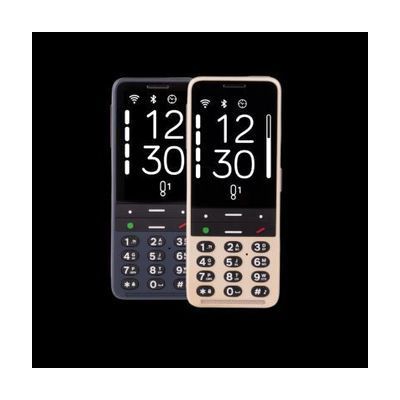
BlindShell Classic 3 Talking Cell Phone
by Blindshell
$690.00 ▲ $161.00 (30%)
Price is what the vendor listed when last checked. Confirm it with the vendor before buying.
Last verified September 20, 2026 · classified April 26, 2026
What it is
Summary
AI-generated from vendor-published content · April 26, 2026
The BlindShell Classic 3 is a tactile-button cell phone designed specifically for blind and low vision users, where every function — calls, texts, email, apps — is spoken aloud by the built-in screen reader and controlled through physical buttons rather than a touchscreen. It bridges the gap between the simplicity of a traditional feature phone and the functionality of a smartphone, with accessible apps like Be My Eyes, Audible, and a color identifier built in alongside everyday tools like GPS, camera, and an SOS button. This is a complete, standalone solution that works as your primary phone — it requires a SIM card and cellular service, but no additional hardware or accessibility software. One important consideration: because this is a purpose-built accessible phone rather than a mainstream device, third-party app availability is more limited than on iOS or Android, and some popular apps may not be supported or may require workarounds.
Quick Facts Catalog facts · auto-generated
- AT Act lending
- Out of pocket
- Vocational rehab
What Setup Looks Like
- Out of the box
- Insert a compatible SIM card to activate cellular service.
- Power on — the phone speaks all menus aloud from the first boot, no accessibility settings to configure.
- With a guide
- Set up contacts, speed dials, and email accounts using the built-in guided menus.
- Download apps from the BlindShell catalog via the onscreen app store with a Wi-Fi connection.
- Configure the Tandem remote support app to allow a sighted helper to assist remotely when needed — allow 30–60 minutes total for full initial setup. See manufacturer support resources for detailed instructions.
Getting it
Try Before You Buy
Devices like this are often available to borrow through your state's AT Act program — typically free or low-cost — so you can try it before buying or pursuing funding.
Where to Get It
These are the vendors WhatCanHelp tracks for this product — it may also be available from other retailers or a local supplier, and prices vary.
Some links may be affiliate links — WhatCanHelp may earn a small commission from purchases at no extra cost to you. More on affiliates →
As an Amazon Associate we earn from qualifying purchases.
How to Fund This
Equipment like this is often pursued through official state programs. These are common starting points — each program decides its own eligibility and what it covers, so the first step is always a phone call.
Compare & explore
Sources & fine print
Vendor facts (name, price, platforms, vendor link) sourced from Blindshell — view on vendor site; last verified September 20, 2026.
Classification & description AI-generated from vendor-published content on April 26, 2026 · confidence: high. Vendor specs may lag; verify before relying on details in a clinical or funding artifact.