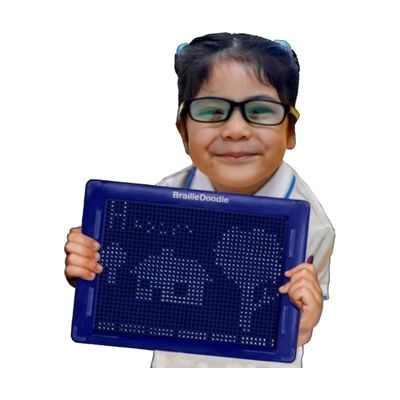
BrailleDoodle Learning Aid
by The TouchPad Pro Foundation
Price is what the vendor listed when last checked. Confirm it with the vendor before buying.
Last verified September 20, 2026 · classified April 26, 2026
What it is
Summary
AI-generated from vendor-published content · April 26, 2026
The BrailleDoodle is a two-sided tactile tablet that lets users raise and erase individual dots using ball bearings and a magnetic stylus — one side is laid out as a braille practice board with guided examples and two rows of 19 braille cells, and the other is a blank grid for creating tactile graphics and diagrams. It's designed for anyone learning to read and write braille, whether a newly diagnosed child, a teacher of students with visual impairments, or an adult adjusting to vision loss. This is a complete, standalone tool — no power source, app, or additional hardware needed — and the included stencils help beginners get started right away. Learning braille takes sustained practice and typically benefits from instruction by a teacher of students with visual impairments (TVI); this tool supports that process but isn't a substitute for structured instruction.
Quick Facts Catalog facts · auto-generated
- AT Act lending
- Out of pocket
- School district
What Setup Looks Like
- Out of the box
- Use the magnetic stylus to push ball bearings up, forming braille dots or tactile shapes.
- Press down on any raised ball bearing to erase it and reset that cell.
- Use the included stencils on the doodle side to guide initial practice shapes and braille patterns.
- With professional help
- A teacher of students with visual impairments (TVI) can sequence braille instruction using the practice side and supplement with additional stencils for contractions, math braille, or other curricula.
- Expect integration into existing braille instruction sessions rather than a one-time setup — the tool is an ongoing practice aid.
Getting it
Try Before You Buy
Devices like this are often available to borrow through your state's AT Act program — typically free or low-cost — so you can try it before buying or pursuing funding.
Where to Get It
This is the vendor WhatCanHelp tracks for this product — it may also be available from other retailers or a local supplier, and prices vary.
Some links may be affiliate links — WhatCanHelp may earn a small commission from purchases at no extra cost to you. More on affiliates →
As an Amazon Associate we earn from qualifying purchases.
Wondering how equipment like this gets paid for? See the official funding programs in your state.
Compare & explore
Sources & fine print
Vendor facts (name, price, platforms, vendor link) sourced from The TouchPad Pro Foundation — view on vendor site; last verified September 20, 2026.
Classification & description AI-generated from vendor-published content on April 26, 2026 · confidence: high. Vendor specs may lag; verify before relying on details in a clinical or funding artifact.