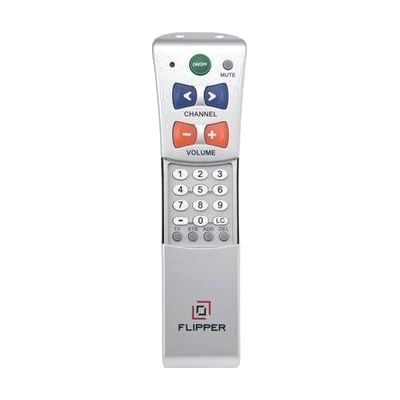
Flipper Remote
Price is what the vendor listed when last checked. Confirm it with the vendor before buying.
What it is
Summary
AI-generated from vendor-published content · October 1, 2026
The Flipper is a simplified universal remote that controls both your TV and a set-top box (a cable or satellite receiver) with a short list of large, easy-to-find buttons. One power button turns both devices on and off together. Volume and channel work left to right: press right for more volume or a higher channel, press left for less or lower. You can also save up to 30 favorite channels so the channel buttons skip everything else. It takes two AAA batteries, which aren't included, and it's set up in one of three ways: entering a code, searching for one automatically, or copying signals from your current remote.
Getting it
Try before you buy
Devices like this are often available to borrow through your state's AT Act program — typically free or low-cost — so you can try it before buying or pursuing funding.
Where to get it
This is the vendor WhatCanHelp tracks for this product — it may also be available from other retailers or a local supplier, and prices vary.
Wondering how equipment like this gets paid for? See the official funding programs in your state.
Details
Quick Facts Catalog facts · auto-generated
- Platform
- Age range
- Complexity
- Setup with instructions
- Price
- $39.99
- Funding
- AT Act lending
- Out of pocket
What setup looks like
- With a guide
- Put in two AAA batteries, then pick a setup method: enter a code for your TV brand, let the remote search for a code automatically, or use learning mode to copy signals from your existing remote.
- Test the power, volume, and channel buttons on both the TV and the set-top box. It comes preset for most Motorola set-top boxes, but other brands need a code or learning mode.
- If you want favorite channels, program up to 30 and turn that feature on so the channel buttons scroll only through them. Plan on about 30 minutes in all.
Compare & explore
Sources & fine print
Vendor facts (name, price, platforms, vendor link) sourced from Independent Living Aids — view on vendor site (opens in a new tab); last checked November 4, 2026.
Classification & description AI-generated from vendor-published content on October 1, 2026 · confidence: high. Vendor specs may lag; verify before relying on details in a clinical or funding artifact.