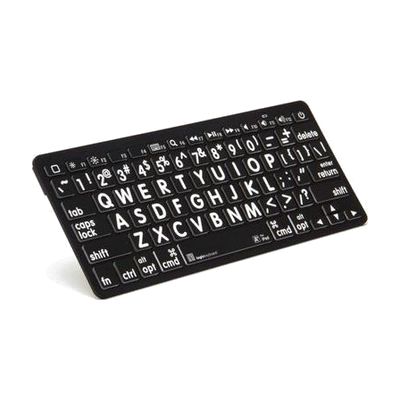
iPad Bluetooth keypad - Black Keys, White Letters
$114.95 ▲ $9.19 (9%)
Price is what the vendor listed when last checked. Confirm it with the vendor before buying.
Last verified September 20, 2026 · classified April 26, 2026
What it is
Summary
AI-generated from vendor-published content · April 26, 2026
This is a Bluetooth keyboard designed for iPad, iPhone, and iPod users who have difficulty reading standard-sized key labels — it features bold black letters on white keys for high-contrast visibility. It's a good fit for someone with low vision who wants to type on their Apple device without squinting at the small, low-contrast keys on a typical wireless keyboard. The package is complete out of the box: the keyboard, two AAA batteries, and a quick setup guide are all included, and it pairs wirelessly via Bluetooth up to about 33 feet away. This keyboard is Apple iOS-specific and won't work reliably with Android or Windows devices, and the high-contrast scheme here is black text on white keys — if you need white text on black keys for a different contrast preference, that's a separate product.
Quick Facts Catalog facts · auto-generated
- AT Act lending
- Out of pocket
- Vocational rehab
What Setup Looks Like
- Out of the box
Install the two included AAA batteries. - With a guide
- On the iPad/iPhone, go to Settings > Bluetooth and turn Bluetooth on.
- Press the pairing button on the keyboard to make it discoverable.
- Select the keyboard from the list of available devices on the iOS screen — pairing typically completes in under a minute. See manufacturer support resources for detailed instructions.
Getting it
Try Before You Buy
Devices like this are often available to borrow through your state's AT Act program — typically free or low-cost — so you can try it before buying or pursuing funding.
Where to Get It
This is the vendor WhatCanHelp tracks for this product — it may also be available from other retailers or a local supplier, and prices vary.
Some links may be affiliate links — WhatCanHelp may earn a small commission from purchases at no extra cost to you. More on affiliates →
As an Amazon Associate we earn from qualifying purchases.
How to Fund This
Equipment like this is often pursued through official state programs. These are common starting points — each program decides its own eligibility and what it covers, so the first step is always a phone call.
Compare & explore
Sources & fine print
Vendor facts (name, price, platforms, vendor link) sourced from Independent Living Aids — view on vendor site; last verified September 20, 2026.
Classification & description AI-generated from vendor-published content on April 26, 2026 · confidence: high. Vendor specs may lag; verify before relying on details in a clinical or funding artifact.