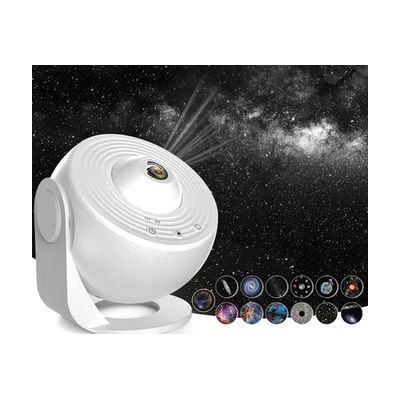
Sensa Galaxy Projector
Last verified June 20, 2026 · classified May 9, 2026
What it is
Summary
AI-generated from vendor-published content · May 9, 2026
This ceiling and wall projector displays rotating space imagery — planets, galaxies, and nebulae — across a large area of a room, creating an immersive visual environment. It's primarily used in sensory rooms and calming spaces for children and adults who benefit from low-stimulation visual input for regulation, relaxation, or engagement — particularly those with autism, sensory processing differences, ADHD, or profound and multiple learning disabilities. The kit includes a set of educational slides depicting solar system content, which also makes it useful for multi-sensory learning activities. It runs on USB power and includes a timer and adjustable rotation speed, so it works as a standalone piece without complicated setup. The projection covers about 12.5 square meters, so room size and ambient light levels will significantly affect the visual impact — it works best in a darkened space.
Quick Facts Catalog facts · auto-generated
- AT Act lending
- Medicaid waiver
- Out of pocket
- School district
What Setup Looks Like
- Out of the box
- Plug into USB power source and power on to begin projecting immediately.
- Adjust rotation speed and set the built-in timer as needed.
- Swap included slides to change the projected imagery.
- With a guide
- Position and angle the projector to optimize coverage for your specific room dimensions.
- Integrate into a sensory room layout alongside other equipment for best therapeutic effect — allow 30–60 minutes to experiment with placement and settings. See manufacturer support resources for detailed instructions.
Getting it
Try Before You Buy
Devices like this are often available to borrow through your state's AT Act program — typically free or low-cost — so you can try it before buying or pursuing funding.
Where to Get It
Some links may be affiliate links — WhatCanHelp may earn a small commission from purchases at no extra cost to you. More on affiliates →
How to Fund This
Equipment like this is often pursued through official state programs. These are common starting points — each program decides its own eligibility and what it covers, so the first step is always a phone call.
Compare & explore
Sources & fine print
Vendor facts (name, price, platforms, vendor link) sourced from Inclusive Technology — view on vendor site; last verified June 20, 2026.
Classification & description AI-generated from vendor-published content on May 9, 2026 · confidence: medium. Vendor specs may lag; verify before relying on details in a clinical or funding artifact.