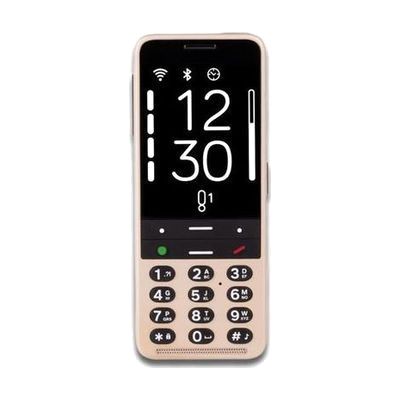
Blindshell Classic 3 | Blind Low Vision Cell Phone
by Blindshell
Price is what the vendor listed when last checked. Confirm it with the vendor before buying.
Last verified September 16, 2026 · classified May 31, 2026
What it is
Summary
AI-generated from vendor-published content · May 31, 2026
The Blindshell Classic 3 is a dedicated cell phone designed from the ground up for people who are blind or have significant low vision — not an adapted smartphone, but a purpose-built device with large tactile keys, a simplified menu structure, and full text-to-speech throughout. It ships with a suite of vision-specific features including Observo, a camera-based AI tool that can describe scenes, read printed text, identify currency, recognize colors, and translate text aloud. The built-in Luna AI assistant handles voice-driven tasks like adding contacts, sending messages, and setting alarms, while the Tandem app lets a sighted helper remotely assist with settings — useful for seniors or anyone who prefers hands-on support. This is a complete, standalone phone that works on cellular networks; you'll need a compatible SIM card and carrier plan, which aren't included. The tradeoff for simplicity is limited app availability compared to mainstream smartphones — users wanting full Android flexibility or third-party app ecosystems may find it restrictive, but for someone who wants a reliable, eyes-free phone without the learning curve of VoiceOver or TalkBack, it's a well-targeted option.
Quick Facts Catalog facts · auto-generated
- AT Act lending
- Out of pocket
- Vocational rehab
What Setup Looks Like
- Out of the box
- Insert a compatible SIM card (sold separately — check Blindshell's carrier compatibility list before purchasing).
- Power on and navigate the accessible menu using tactile keys and text-to-speech guidance.
- With a guide
- Use the included documentation or Blindshell's online tutorials to configure contacts, Wi-Fi, and preferred accessibility settings.
- Set up the Tandem remote assistance app by coordinating with a trusted helper who will install the companion app on their own device.
- Expect 30–60 minutes to complete initial setup with a guide. See manufacturer support resources for detailed instructions.
Getting it
Try Before You Buy
Devices like this are often available to borrow through your state's AT Act program — typically free or low-cost — so you can try it before buying or pursuing funding.
Where to Get It
This is the vendor WhatCanHelp tracks for this product — it may also be available from other retailers or a local supplier, and prices vary.
Some links may be affiliate links — WhatCanHelp may earn a small commission from purchases at no extra cost to you. More on affiliates →
As an Amazon Associate we earn from qualifying purchases.
How to Fund This
Equipment like this is often pursued through official state programs. These are common starting points — each program decides its own eligibility and what it covers, so the first step is always a phone call.
Compare & explore
Sources & fine print
Vendor facts (name, price, platforms, vendor link) sourced from Blindshell — view on vendor site; last verified September 16, 2026.
Classification & description AI-generated from vendor-published content on May 31, 2026 · confidence: high. Vendor specs may lag; verify before relying on details in a clinical or funding artifact.