Control Pro
Price is what the vendor listed when last checked. Confirm it with the vendor before buying.
Last verified September 16, 2026 · classified April 26, 2026
What it is
Summary
AI-generated from vendor-published content · April 26, 2026
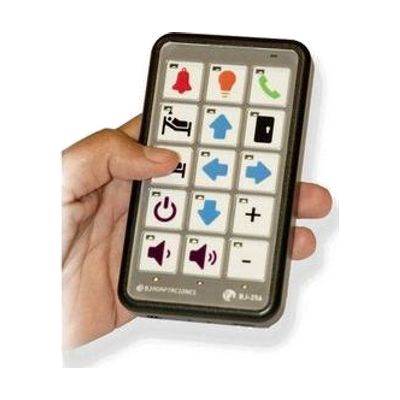
The Control Pro is a switch-accessible infrared universal remote that can learn and replicate the signals from virtually any IR-based remote control, letting a single user control up to 112 household devices — TVs, air conditioners, fans, and more — from one handheld unit. It's designed for someone with limited hand function or dexterity who struggles to operate standard remotes, particularly those who use single-switch scanning as their primary access method. You get a complete, ready-to-use device: the remote itself, software for customizing the keypad overlay with photos or symbols, and built-in IR learning — no subscription or companion app required. Setup involves programming each device's IR codes and configuring scan sequences, which takes meaningful time and benefits from some trial-and-error or guidance from a support person familiar with switch access.
Quick Facts Catalog facts · auto-generated
- AT Act lending
- Medicaid waiver
- Out of pocket
- Vocational rehab
What Setup Looks Like
- Out of the box
Hang the device around the neck or attach to a wheelchair using the included lanyard/mount — the device is functional as a keypad remote immediately. - With a guide
- Use the IR learning mode to point each existing remote at the Control Pro and record functions button by button for each device you want to control.
- Use the included software to design and print a custom keypad overlay with images or symbols meaningful to the user.
- Configure external switch scanning speed and sequence to match the user's access needs — expect 1–3 hours of total setup across multiple sessions.
- See manufacturer support resources at RJ Cooper & Associates for detailed instructions.
- With professional help
- An occupational therapist (OT) or assistive technology professional (ATP) can assess optimal switch type, scanning speed, and keypad layout to match the user's motor and cognitive profile.
- Expect 1–2 sessions to trial switch access and finalize device programming.
Getting it
Try Before You Buy
Devices like this are often available to borrow through your state's AT Act program — typically free or low-cost — so you can try it before buying or pursuing funding.
Where to Get It
This is the vendor WhatCanHelp tracks for this product — it may also be available from other retailers or a local supplier, and prices vary.
Some links may be affiliate links — WhatCanHelp may earn a small commission from purchases at no extra cost to you. More on affiliates →
As an Amazon Associate we earn from qualifying purchases.
How to Fund This
Equipment like this is often pursued through official state programs. These are common starting points — each program decides its own eligibility and what it covers, so the first step is always a phone call.
Compare & explore
Sources & fine print
Vendor facts (name, price, platforms, vendor link) sourced from RJ Cooper & Associates — view on vendor site; last verified September 16, 2026.
Classification & description AI-generated from vendor-published content on April 26, 2026 · confidence: high. Vendor specs may lag; verify before relying on details in a clinical or funding artifact.