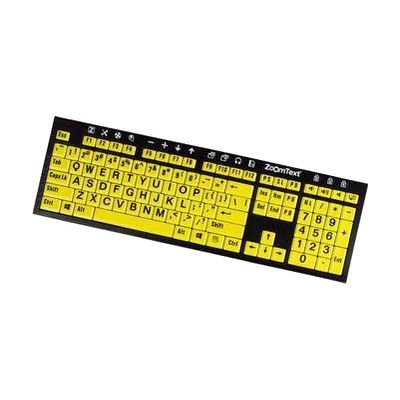
ZoomText Large-Print Keyboard - U.S. English - Black Print on Yellow
Price is what the vendor listed when last checked. Confirm it with the vendor before buying.
Last verified September 16, 2026 · classified April 26, 2026
What it is
Summary
AI-generated from vendor-published content · April 26, 2026
This is a full-size USB keyboard with oversized 36-point letters printed in high-contrast black on yellow, designed for people who have difficulty reading standard keyboard labels. It's a practical tool for someone with low vision who uses a computer regularly — the large, bold key labels reduce eye strain and guesswork when typing. The keyboard also includes dedicated shortcut keys for Freedom Scientific's ZoomText magnification software, so common functions like adjusting zoom level or launching the screen reader are triggered without memorizing key combinations. This keyboard works best as part of a ZoomText setup — the function key shortcuts are only useful if you're already using ZoomText, and without that software it's simply a large-print keyboard.
Quick Facts Catalog facts · auto-generated
- AT Act lending
- Out of pocket
- School district
- Vocational rehab
What Setup Looks Like
- Out of the box
- Plug the keyboard into a USB port on your Windows computer — it works as a standard keyboard right away.
- Large-print keys are immediately visible without any configuration.
- With a guide
- If using ZoomText, install and activate the software separately.
- Review the ZoomText keyboard shortcut guide to learn which function keys trigger which magnification commands.
- Optionally, reassign function keys to custom ZoomText or application commands using ZoomText's settings panel — allow 15–30 minutes. See manufacturer support resources for detailed instructions.
Getting it
Try Before You Buy
Devices like this are often available to borrow through your state's AT Act program — typically free or low-cost — so you can try it before buying or pursuing funding.
Where to Get It
This is the vendor WhatCanHelp tracks for this product — it may also be available from other retailers or a local supplier, and prices vary.
Some links may be affiliate links — WhatCanHelp may earn a small commission from purchases at no extra cost to you. More on affiliates →
As an Amazon Associate we earn from qualifying purchases.
How to Fund This
Equipment like this is often pursued through official state programs. These are common starting points — each program decides its own eligibility and what it covers, so the first step is always a phone call.
Compare & explore
Sources & fine print
Vendor facts (name, price, platforms, vendor link) sourced from Freedom Scientific — view on vendor site; last verified September 16, 2026.
Classification & description AI-generated from vendor-published content on April 26, 2026 · confidence: high. Vendor specs may lag; verify before relying on details in a clinical or funding artifact.