Orcam Read
by OrCam
$1,890.00 ▼ $100.00 (5%)
Last verified July 5, 2026 · classified July 7, 2026
What it is
Summary
AI-generated from vendor-published content · July 7, 2026
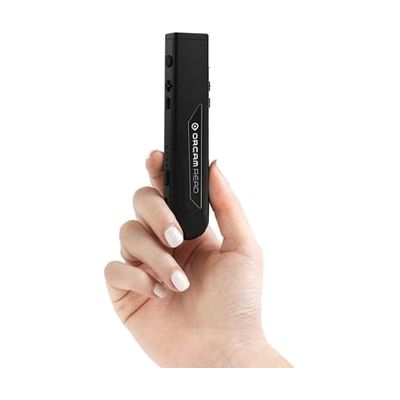
The OrCam Read is a handheld pen-shaped device that uses a built-in camera to capture printed text and read it aloud through a small speaker, Bluetooth, or headphone jack — no phone, internet, or WiFi required. It's designed for people who struggle to read printed material due to dyslexia, low vision, or other print disabilities, and works on books, menus, documents, screens, and most other printed surfaces. The Smart version adds voice command functionality, so a user can say something like 'read the main headline' rather than capturing the entire page. This is a standalone, self-contained device — no companion app or subscription is needed — though getting the most out of the voice command features does take some practice, and the device reads text aloud rather than displaying it, so it won't substitute for a full screen reader or magnification solution for digital content.
Quick Facts Catalog facts · auto-generated
- AT Act lending
- Out of pocket
- School district
- Vocational rehab
What Setup Looks Like
- Out of the box
- Charge the device fully before first use.
- Point the device at printed text and press the button — it captures an image and begins reading aloud through the built-in speaker.
- Connect Bluetooth headphones or plug in wired earbuds for private listening.
- With a guide
- Review the OrCam quick-start guide to learn gesture and voice command features (e.g., 'read the second paragraph').
- Practice pointing and capturing technique on different text types — high-contrast printed text works best.
- Allow 30–60 minutes to become comfortable with voice commands and audio output settings. See manufacturer support resources for detailed instructions.
Getting it
Try Before You Buy
Devices like this are often available to borrow through your state's AT Act program — typically free or low-cost — so you can try it before buying or pursuing funding.
Where to Get It
Some links may be affiliate links — WhatCanHelp may earn a small commission from purchases at no extra cost to you. More on affiliates →
How to Fund This
Equipment like this is often pursued through official state programs. These are common starting points — each program decides its own eligibility and what it covers, so the first step is always a phone call.
Compare & explore
Sources & fine print
Vendor facts (name, price, platforms, vendor link) sourced from OrCam — view on vendor site; last verified July 5, 2026.
Classification & description AI-generated from vendor-published content on July 7, 2026 · confidence: high. Vendor specs may lag; verify before relying on details in a clinical or funding artifact.