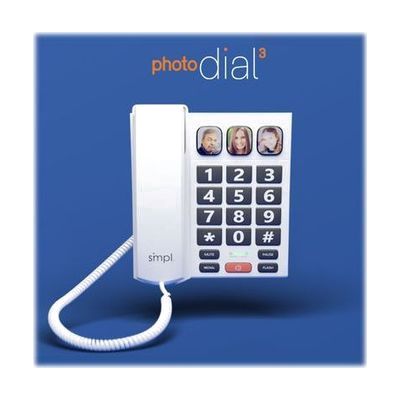
smpl Photo Dial 3 Phone Amplified for Hearing and Visually Impaired
Price is what the vendor listed when last checked. Confirm it with the vendor before buying.
What it is
Summary
AI-generated from vendor-published content · October 1, 2026
The photoDIAL 3 is a landline phone built around photo memory buttons, so you can call someone with one press on their picture, without lifting the handset. It also boosts the volume of the caller's voice, with a sliding switch for low, medium, and high amplification. The case is rugged plastic and was drop tested from six feet, and it can sit on a desk or mount on a wall. This is a good fit for someone who struggles to read small numbers, remember phone numbers, or hear a standard phone. The photos and numbers have to be set up ahead of time, so a family member or caregiver will usually do that part.
Getting it
Try before you buy
Devices like this are often available to borrow through your state's AT Act program — typically free or low-cost — so you can try it before buying or pursuing funding.
Where to get it
This is the vendor WhatCanHelp tracks for this product — it may also be available from other retailers or a local supplier, and prices vary.
How to fund this
These are common places to ask about paying for equipment like this. Each one decides its own eligibility and what it covers, so start by asking them.
Details
Quick Facts Catalog facts · auto-generated
- Platform
- Complexity
- Setup with instructions
- Price
- $49.99
- Funding
- AT Act lending
- Medicaid waiver
- Out of pocket
What setup looks like
- With a guide
- Plug the phone cord into your wall jack and connect the included power adapter. Set it on the included stand or mount it on a wall.
- Add the photos and phone numbers for the one-touch buttons, then set the earpiece and ringer volume and the amplification switch to suit the person using it.
- Plan on about 30 minutes, mostly for loading contacts and photos. Follow the included quick start guide and user guide, and
Compare & explore
Sources & fine print
Vendor facts (name, price, platforms, vendor link) sourced from MaxiAids — view on vendor site (opens in a new tab); last checked November 2, 2026.
Classification & description AI-generated from vendor-published content on October 1, 2026 · confidence: high. Vendor specs may lag; verify before relying on details in a clinical or funding artifact.