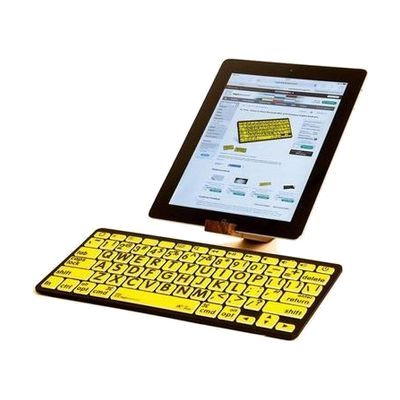
PC Bluetooth Mini Keyboard- Large Print Black on Yellow
Price is what the vendor listed when last checked. Confirm it with the vendor before buying.
What it is
Summary
AI-generated from vendor-published content · October 1, 2026
This compact Bluetooth keyboard puts bold black letters and numbers on yellow keys, so the characters are easy to pick out when you're typing. The strong contrast is meant to cut down on typing mistakes and eyestrain. It connects wirelessly to Windows devices that have Bluetooth, and at about 11 by 5 inches and 11 ounces, it's small and light. It's a good fit if standard keyboards are hard to read, but you'll need to pair it with your computer before first use.
Getting it
Try before you buy
Devices like this are often available to borrow through your state's AT Act program — typically free or low-cost — so you can try it before buying or pursuing funding.
Where to get it
This is the vendor WhatCanHelp tracks for this product — it may also be available from other retailers or a local supplier, and prices vary.
How to fund this
These are common places to ask about paying for equipment like this. Each one decides its own eligibility and what it covers, so start by asking them.
Details
Quick Facts Catalog facts · auto-generated
- Addresses
- Platform
- Age range
- Complexity
- Setup with instructions
- Price
- $114.90
- Funding
- AT Act lending
- Out of pocket
- Vocational rehab
What setup looks like
- Out of the box
Turn the keyboard on and make sure it's close to your Windows device. - With a guide
- Open the Bluetooth settings on your Windows device and put the keyboard in pairing mode.
- Select the keyboard from the list of found devices and finish pairing.
- Type in a document to confirm every key works. Plan on about 10-15 minutes.
Compare & explore
Sources & fine print
Vendor facts (name, price, platforms, vendor link) sourced from MaxiAids — view on vendor site (opens in a new tab); last checked November 2, 2026.
Classification & description AI-generated from vendor-published content on October 1, 2026 · confidence: high. Vendor specs may lag; verify before relying on details in a clinical or funding artifact.