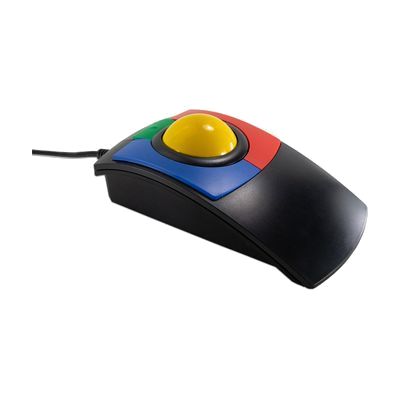
X-keys O-Trac Trackball (Colours)
Est. $60–$120, see price history
Typical price range, not a vendor quote. Confirm it with the vendor before buying.
What it is
Summary
AI-generated from vendor-published content · October 1, 2026
The O-Trac is a wired USB trackball that gives young learners a steadier alternative to a regular mouse. The cursor moves by rolling the ball with your hand or fingers, so the whole device stays put on the desk. Its low case doubles as a hand rest, and a drag lock feature lets you click once to hold a drag, then click again to let go, which helps with selecting text or moving items without holding a button down. It plugs in with no software and works with Windows, Mac, and iPadOS/iOS devices, including iOS accessibility features like Switch Control. The body is built to hold up in classrooms.
Getting it
Try before you buy
Devices like this are often available to borrow through your state's AT Act program — typically free or low-cost — so you can try it before buying or pursuing funding.
Where to get it
This is the vendor WhatCanHelp tracks for this product — it may also be available from other retailers or a local supplier, and prices vary.
How to fund this
These are common places to ask about paying for equipment like this. Each one decides its own eligibility and what it covers, so start by asking them.
Details
Quick Facts Catalog facts · auto-generated
- Addresses
- Platform
- Age range
- Complexity
- Setup with instructions
- Price
- Est. $60–$120
- Funding
- AT Act lending
- Out of pocket
- School district
- Vocational rehab
What setup looks like
- Out of the box
Plug the trackball into a USB port. No software is needed, and it should start moving the cursor right away. - With a guide
On an iPad or iPhone, you may need a USB adapter to connect it, and you can then turn on iOS accessibility options such as Switch Control. Plan on about 15-30 minutes. - With professional help
An OT or ATP can help judge whether a trackball suits the child's hand control, where to place it, and how to set cursor speed and drag lock. Plan on one assessment or trial session.
Compare & explore
Sources & fine print
Vendor facts (name, price, platforms, vendor link) sourced from Inclusive Technology — view on vendor site (opens in a new tab); last checked October 31, 2026.
Classification & description AI-generated from vendor-published content on October 1, 2026 · confidence: high. Vendor specs may lag; verify before relying on details in a clinical or funding artifact.