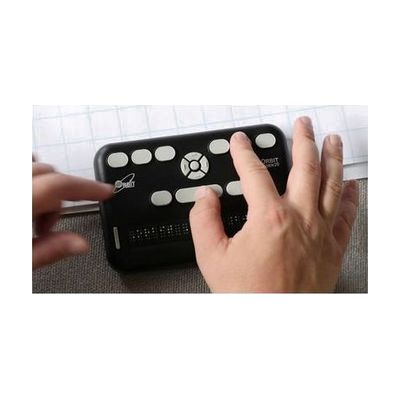
Orbit Reader 20
by American Printing House for the Blind
Price is what the vendor listed when last checked. Confirm it with the vendor before buying.
Last verified September 20, 2026 · classified April 26, 2026
What it is
Summary
AI-generated from vendor-published content · April 26, 2026
The Orbit Reader 20 is a 20-cell refreshable braille display that also works as a standalone e-reader and note-taker — all in one device. It's designed for blind and low-vision users who want to read books, take notes, and control a computer or smartphone through braille, whether or not they're connected to another device. Out of the box it functions on its own using an SD card loaded with BRF or text files; connect it via Bluetooth or USB and it pairs with screen readers like JAWS, NVDA, VoiceOver, or TalkBack on Windows, Mac, iOS, and Android simultaneously. The 20-cell display width is narrower than higher-end 40-cell displays, so reading longer lines of text requires more panning — a tradeoff that comes with the significantly lower price point compared to traditional piezoelectric braille displays.
Quick Facts Catalog facts · auto-generated
- AT Act lending
- Out of pocket
- School district
- Vocational rehab
What Setup Looks Like
- Out of the box
- Insert an SD card loaded with BRF or text files to start reading books immediately — no computer needed.
- Use the navigation buttons to browse folders and open files.
- With a guide
- Pair the device via Bluetooth to your smartphone or computer.
- Enable your screen reader (VoiceOver, TalkBack, JAWS, NVDA) and select the Orbit Reader 20 as your braille display input — typically takes 15–30 minutes with the quick-start guide.
- See manufacturer support resources for detailed instructions.
- With professional help
- A vision rehabilitation therapist (VRT) or assistive technology specialist (ATP) can help configure screen reader braille settings, grade settings (contracted vs. uncontracted braille), and optimize the device for a student or professional workflow.
- Expect 1–2 sessions for initial setup and orientation.
Getting it
Try Before You Buy
Devices like this are often available to borrow through your state's AT Act program — typically free or low-cost — so you can try it before buying or pursuing funding.
Where to Get It
These are the vendors WhatCanHelp tracks for this product — it may also be available from other retailers or a local supplier, and prices vary.
Some links may be affiliate links — WhatCanHelp may earn a small commission from purchases at no extra cost to you. More on affiliates →
As an Amazon Associate we earn from qualifying purchases.
How to Fund This
Equipment like this is often pursued through official state programs. These are common starting points — each program decides its own eligibility and what it covers, so the first step is always a phone call.
Compare & explore
Sources & fine print
Vendor facts (name, price, platforms, vendor link) sourced from American Printing House for the Blind — view on vendor site; last verified September 20, 2026.
Classification & description AI-generated from vendor-published content on April 26, 2026 · confidence: high. Vendor specs may lag; verify before relying on details in a clinical or funding artifact.