Browse Assistive Technology
Products
-

Unity AAC
Unity AAC is a speech-generating app that helps someone communicate by tapping symbols that speak words and phrases aloud. It uses Minspeak multi-meaning symbols, so each symbol on the home screen opens a group of related words sorted by part of speech. The button locations stay consistent, which helps a person learn and recall words through repeated motor patterns. It comes with thousands of core and fringe words already stored, plus spaces you can edit to add your own vocabulary, and it has built-in teaching tools like an in-app tutorial, Vocabulary Builder, and Word Finder. It runs on iPhone, iPad, or Mac, so check that your Apple device is compatible before you commit. A 30-day trial is offered through a PRC-Saltillo account.
Verified 4 days agoProfessional setup required -
Dialogue AAC
$99.99
Dialogue AAC is an app for iPad and iPhone that lets adults who can read and spell communicate through a keyboard layout, with word prediction and quick phrases to speed things up. It is built for literate people who have trouble using their natural voice. It also includes the Essence vocabulary system, offered in 60-location and 84-location layouts to suit different visual and motor abilities. This is an app, not a device, so you'll need a compatible iPad or iPhone, and a speech-language pathologist can help match the layout and settings to the person.
Verified 4 days agoProfessional guidance helps -

AAC Speak Helper
Free
AAC Speak Helper is a free Windows program that takes text you copy to the clipboard, then translates it, converts it between writing systems (such as Latin to Devanagari), and reads it aloud using text-to-speech voices from several providers. It's meant to be called from another AAC app on Windows that can run outside programs, so it helps most when someone needs to speak a language their AAC app's voices handle poorly. For example, a Ukrainian speaker could have their text turned into English for caregivers. It has no main window of its own, but a separate Configure app lets you set options and keep different settings files for different tasks. You'll need to run the server and client yourself and edit your pagesets to add a speak button, so it's not a plug-and-play tool.
Verified 4 days agoProfessional guidance helps -

Anybook Audio Pen AAC Device
$93.50
The Anybook Audio Pen is a pen-shaped voice output device that lets you attach recorded sound to books, worksheets, and objects. You stick a sticker on whatever you want to label, then touch the sticker with the pen to record a message or play it back. It holds about 200 hours of recordings, so a family or classroom can build up a lot of labeled materials over time. It suits children and adults who benefit from hearing spoken language tied to the things they see and handle. The recordings are only as good as the ones you make, so someone needs to take the time to record and place the stickers.
Verified 3 days agoSetup with instructions -
Proloquo2Go - AAC app with symbols - AssistiveWare
$124.99 – $249.99
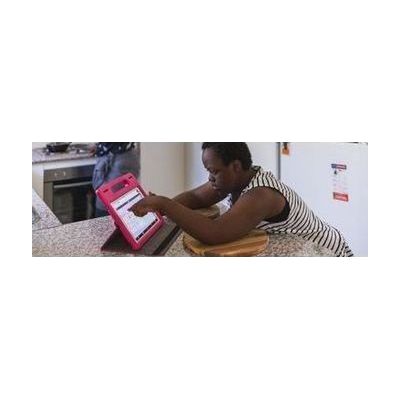
Proloquo2Go is a symbol-based AAC app for iPad and iPhone that gives nonspeaking children and adults a way to speak out loud and start conversations. Because it can be personalized to fit different needs, it works for a wide range of communicators. Expect the app to be only part of the picture: a speech-language pathologist can help choose the right layout and vocabulary, and the person using it will need time and a communication partner who models using it.
Verified 4 days agoProfessional guidance helps -

STACS: Standardized Tactile Augmentative Communication Symbols
$734.81
STACS is a set of standardized tactile symbols that a learner can feel with their hands to talk about people, places, events, and ideas. It gives learning partners like teachers, parents, and peers a beginning vocabulary to teach, and they can add more individualized symbols as the learner's needs grow. A digital instruction manual and online videos show partners how to use the symbols as part of daily communication, so it's meant for someone who has no formal way to communicate yet. This is a teaching system, not a one-touch device, so the people around the learner need to put in time to teach the symbols well.
Verified 3 days agoProfessional guidance helps -
AACtivity Communicator & Musical Instrument
Est. $150–$350
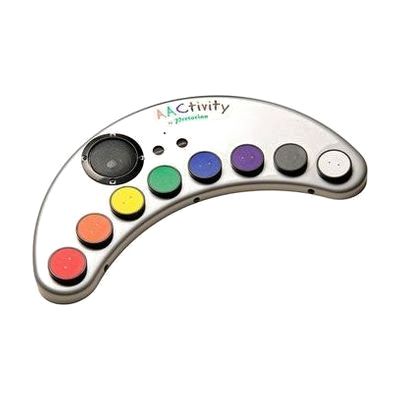
The AACtivity Communicator is a single device that works as both a recordable message board and a simple musical instrument. It has eight buttons across eight levels and eight minutes of recording time, so you can record your own messages, and it also includes 64 ready-made sounds sorted into eight groups such as animals, transport, emotions, and indoor and outdoor sounds. In its music modes, it becomes a one-octave piano or a rock guitar, or it lights up buttons in a scanning pattern so a user can play well-known songs. It can be used with one or two switches, including SimplyWorks wireless switches, which makes it a good fit for a child who needs a switch-accessible way to make choices, make sounds, and take part in music. The sound set and play focus suggest it is best for early communication and cause-and-effect learning rather than full-sentence communication.
Verified 4 days agoSetup with instructions -
IR Controller
Est. $150–$400
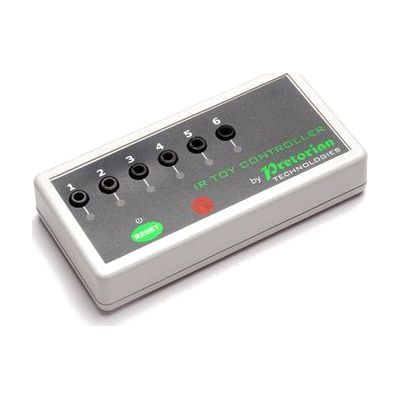
The IR Controller lets someone who uses an AAC (speech-generating) device run switch-adapted equipment from that same device. It picks up the infrared signal the AAC device sends out and turns it into six separate switch outputs. Those outputs can run things like a switch-adapted bubble machine or an appliance controller such as the iClick mains controller. Each output can work in Latched, Timed, or On/Off mode, and ready-made Gridsets/Pagesets (the page layouts used on AAC devices) can be downloaded and changed with your own pictures and button sizes. It suits someone who would rather control their surroundings through the device they already use than through a separate switch. It is a piece of a larger setup, so you will need an AAC device with an IR output and something switch-adapted to plug in.
Verified 4 days agoProfessional guidance helps -

Cboard
Free
Cboard is a free AAC app that runs in a web browser. It lets someone communicate by tapping pictures, photos, or words on a board, and the app then speaks them aloud. Two symbol libraries are built in (Mulberry and ARASAAC), and you can build your own boards with your own symbols, photos, or text. It supports more than 40 languages and can be installed as an offline-capable web app, so it keeps working without an internet connection. Because it's software, you'll supply the phone, tablet, or computer yourself, and the boards will only be as useful as the vocabulary someone sets up in them.
Verified 4 days agoSetup with instructions -

Proloquo and Proloquo Coach - AssistiveWare
$99.99 every year
Also from $9.99 every month
Proloquo is a symbol-supported AAC app for iPad and iPhone that lets a nonspeaking person communicate by building messages that the device speaks aloud. It comes paired with Proloquo Coach, a companion app that gives step-by-step guidance to the person using AAC, their family, and educators as they get started. Proloquo is aimed at people who can use an iPad on their own, and the pairing is meant to take some of the overwhelm out of beginning AAC.
Verified 4 days agoProfessional guidance helps -
GoTalk Everywhere
$50.00
GoTalk Everywhere is an AAC app, which means it gives someone a way to communicate through tapping buttons that speak or play recordings. It runs on iOS, Android, and the web, and it syncs communication pages across devices through the cloud. A therapist, teacher, or family member can build pages on the web and send them straight to the person who will use them. You get the basics: text-to-speech, voice recording, symbols, your own photos, and grid layouts from 1 up to 30 buttons per page. It's a good fit for someone who needs a simple, adjustable way to start communicating. The best results usually come from a speech-language pathologist helping choose the vocabulary and page layouts.
Verified 3 weeks agoProfessional guidance helps -

GoTalk Go
$249.00 – $249.95
The GoTalk Go is a small AAC (augmentative and alternative communication) device you wear on your wrist like a watch. It has three touch buttons that each play a recorded message. You can set up one, two, or three messages per level, across three levels, for up to nine messages in all. It's a good fit for someone who needs a few quick, always-handy phrases, like asking for help or answering yes or no. With only a handful of messages, it won't replace a full communication system for longer conversations.
Verified 2 days agoSetup with instructions -
Grid for iPad from Smartbox
Est. $99–$349
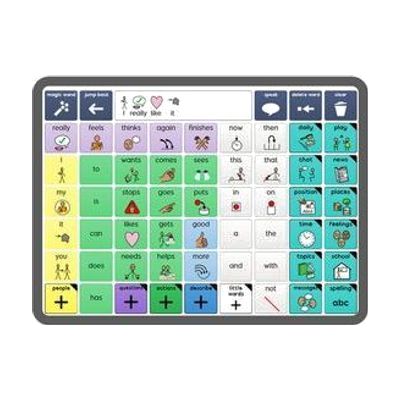
Grid for iPad is an AAC app, which means it helps someone who can't rely on speech to communicate by speaking for them from the iPad. It's built as a full communication platform, with ready-made resources for both symbol-based and text-based communication, so it can fit someone who builds messages from pictures as well as someone who types. You get a library of resources included. It runs on an iPad, so you'll need one, and picking a vocabulary layout and setting it up for the person's needs goes more smoothly with input from a speech-language pathologist.
Verified 4 days agoProfessional guidance helps -
Grid 3 from Smartbox
Price on request: ask the vendor
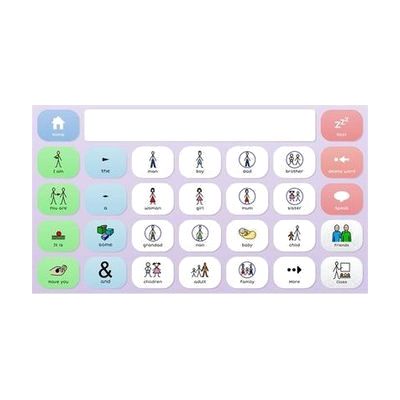
Grid 3 is AAC software, meaning it gives a person a way to speak and write with symbols or text on a screen. It can be used by touch, switch, a pointing device, or eye gaze, so it fits people with very different physical access needs. It starts with ready-made symbol grid sets and grows into text tools with on-screen keyboards and word prediction, so it can follow someone from early cause-and-effect play to advanced writing. It also covers more than talking: it includes 25 animated learning activities, built-in apps like email, SMS, YouTube, and Facebook, full computer control, and control of lights, doors, and TVs. That last feature needs compatible environmental control hardware. Grid pages can be edited and updated remotely, which helps a therapist or family member support the user without taking the device away.
Verified 4 days agoProfessional guidance helps -

Grid for Schools
Grid for Schools is a school-wide AAC package that pairs Grid communication software with training, resources, and specialist support. Students can communicate with symbols or text, using predictive text, sentence completion, and natural-sounding voices, and they can access it by touch, pointer, switch, or eye gaze. It includes ready-made and customizable grid sets for school subjects, a five-step training plan, and guidance on implementation and goal setting. This is a whole-school program rather than a single device, so plan on working with the Smartbox team and your school's specialists to roll it out.
Verified 4 days agoProfessional setup required -
IR Keyboard & Mouse
Est. $150–$350
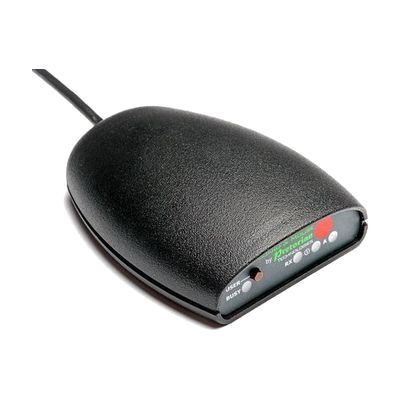
The IR Keyboard & Mouse lets someone who uses an AAC (augmentative and alternative communication) device type and move a mouse on an outside computer. It works through the infra-red output found on most AAC devices, so there is no wireless pairing to deal with. You set up the keyboard and mouse controls by loading downloadable Gridset or Pageset layouts, and you can build your own with larger, eye-gaze-friendly buttons or a layout for a non-UK keyboard. It supports up to four separate user settings, so several people in one room can each have their own control without interference. It suits someone who needs to get onto a computer now and then, such as when moving between work or learning spaces.
Verified 4 days agoProfessional guidance helps -

Accent
Est. $4,000–$8,000
The Accent is a dedicated AAC (augmentative and alternative communication) device, a speech-generating tablet that lets someone communicate through symbols, words, and typing. It runs on Windows and supports several ways of selecting, including eye tracking and switch access, so it can be matched to how a person can physically use it. The glass is thicker and impact-resistant, the body resists splashes and dust, and the handle is stronger. It can also act as a keyboard and mouse for a connected computer, or work as a standalone computer. The communication software, such as NuVoice, is customized to the person, so plan on professional help to choose and set it up.
Verified 4 days agoProfessional setup required -

LAMP Words for Life
$299.99
LAMP Words for Life is an AAC app, which means it gives someone a way to talk by tapping words and phrases on a screen that speaks them aloud. It uses a motor-planning approach, so each word stays in the same place on the screen and a person can learn to reach for it without searching. The vocabulary holds about 4,500 core and fringe words, and a Vocabulary Builder feature lets you teach just a few words at a time. It is offered in English, Spanish, Canadian French, and German, each with matching voices. It suits someone just starting to communicate who will need room to grow into full sentences. It runs on an Apple device, so check the app compatibility page before buying.
Verified 4 days agoProfessional guidance helps -

Apple Assistive Access
Free
Assistive Access is a built-in iPhone and iPad mode that swaps the usual interface for a simpler one with high-contrast buttons, large text labels, and pictures in place of words. Someone who finds a regular phone overwhelming can use a trimmed-down set of apps, including Calls, Messages, Camera, Photos, Music, Magnifier, and the Apple TV app. You can pick a grid layout with icons or a row layout with text. Messages offers an emoji-only keyboard and video messages for people who prefer to communicate visually. AAC apps (apps that speak or display messages for people who don't use speech) and other third-party apps are supported. Setup includes a preview of your choices, so you can see how it will look before you commit. A trusted supporter will usually want to be involved in choosing which apps appear and how they're arranged.
Verified 3 days agoSetup with instructions -

PODD Alternative Access (A4 Version)
Est. $150–$400
This is a set of templates and guides for building PODD communication books, which are paper-based AAC (communication) books, for people who can't point directly to pictures. It covers 22 book layouts for eye-gaze access, partner-assisted visual scanning, and combinations such as eye-gaze plus scanning or coded access. The pack includes an information file on access methods and vocabulary, a step-by-step construction file, Boardmaker templates, and demonstration videos, all on a USB drive. You supply the Boardmaker 6 software, which is needed to customise and print the templates, so this is a build-it-yourself resource and not a ready-made book. It is intended for professionals and families, and it is sold to UK customers only.
Verified 4 days agoProfessional setup required -

Accessible Literacy Learning (ALL)
Est. $149–$499
The ALL Reading Program teaches basic reading skills to students who are nonverbal and use AAC (augmentative and alternative communication). Students can work through the lessons by touch, eye gaze, or scanning, so the program can follow whichever access method works best for them. It runs on Windows and iOS, and on Tobii Dynavox I-Series and I-110 devices. A teacher, SLP, or AT specialist will likely get the best results by choosing the right access method and guiding how the program is used.
Verified 4 days agoProfessional guidance helps -

Widgit Online
Yearly plan: ask the vendor
Widgit Online is a web-based tool for making materials that pair words with pictures (symbols). You can build visual timetables, communication books, flashcards, worksheets, social stories, supported reading materials, mind maps, and templates for AAC devices, either from hundreds of ready-made templates or from a blank page. It runs in a browser on a PC, Mac, or iPad, so there's nothing to install or update. It's a good fit for teachers, parents, and professionals supporting someone with communication needs, or someone building literacy skills. This is a subscription, and the activation code arrives by email after ordering. The vendor lists it for UK customers only, and an optional Dual Language Add-On translates materials into more than 80 languages.
Verified 4 days agoProfessional guidance helps -

Via
Est. $1,500–$8,000
The Via is a speech-generating device built on iOS, so it looks and feels familiar to anyone who has used an iPhone or iPad. It runs research-based AAC apps, including TouchChat, LAMP Words for Life, and WordPower. The family has several models: the Pro, the compact and durable Nano, and the Mini, which is also durable and portable. This is a complete communication device for someone who can't rely on speech. Choosing the right model, app, vocabulary, and way to access it is a big decision, so an evaluation with a speech-language pathologist helps.
Verified 4 days agoProfessional setup required -
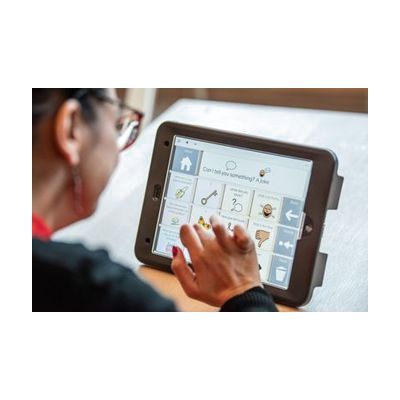
Talk Pad
Est. $1,500–$4,000
The Talk Pad is a dedicated communication device that speaks for someone who can't rely on natural speech. It comes in an 8-inch or 10-inch size and can be provided with Grid AAC software, which lets a person build messages from symbols and text. You can select by touch, add a keyguard (a overlay with holes) for more precise taps, or connect up to two switches. It's built to go places, with a tactile handle, a carry strap, wheelchair mounting, large blue power and volume buttons, a 1m drop-test rating, and IP22 protection. Because the right size, access method, and vocabulary setup vary a lot from person to person, it helps to have a speech-language pathologist or AAC specialist involved.
Verified 4 days agoProfessional guidance helps