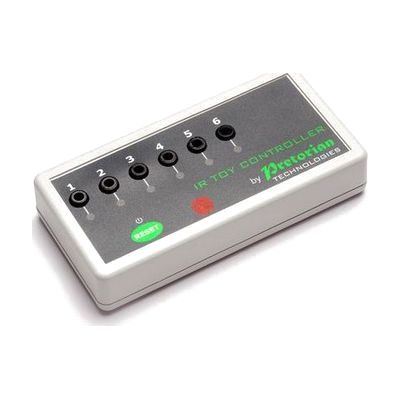
IR Controller
Price is what the vendor listed when last checked. Confirm it with the vendor before buying.
Last verified September 16, 2026 · classified April 26, 2026
What it is
Summary
AI-generated from vendor-published content · April 26, 2026
The IR Controller receives infrared signals from an AAC device and converts them into switch outputs that can activate up to six separate switch-adapted appliances or low-voltage devices — things like a bubble machine, fan, or powered toy. It's designed for AAC users who already control their communication device through eye gaze, scanning, or other access methods, and want to use that same control method to operate their environment without a separate switch. This is a piece of a larger system, not a standalone solution — you need a compatible AAC device with IR output (such as a Tobii Dynavox device or Grid-based system), plus appropriate Gridsets or Pagesets downloaded and configured to map buttons to IR commands. The six outputs work in latched, timed, or on/off modes, giving flexibility for different appliances, but compatible appliances typically need to be switch-adapted or low-voltage, so existing household devices may require additional adapters to work with it.
Quick Facts Catalog facts · auto-generated
- AT Act lending
- Medicaid waiver
- Out of pocket
- Vocational rehab
What Setup Looks Like
- With a guide
- Confirm your AAC device has a working IR output and is compatible with the IR Controller.
- Download appropriate Gridsets or Pagesets from Inclusive Technology for your AAC software (e.g., Grid 3).
- Connect switch-adapted appliances to the IR Controller's output ports.
- Test each output mode (Latched, Timed, On/Off) and customize button images and layout to suit the user. Allow 30–60 minutes for initial configuration. See manufacturer support resources for detailed instructions.
- With professional help
- An assistive technology professional (ATP) or occupational therapist (OT) should assess whether the user's AAC access method reliably triggers IR output before purchasing.
- An SLP or ATP familiar with the user's AAC software should configure Gridsets to integrate environmental control without disrupting core communication pages.
- Expect 1–3 sessions over 1–2 weeks to integrate, test, and refine environmental control alongside AAC use.
Getting it
Try Before You Buy
Devices like this are often available to borrow through your state's AT Act program — typically free or low-cost — so you can try it before buying or pursuing funding.
Where to Get It
This is the vendor WhatCanHelp tracks for this product — it may also be available from other retailers or a local supplier, and prices vary.
Some links may be affiliate links — WhatCanHelp may earn a small commission from purchases at no extra cost to you. More on affiliates →
As an Amazon Associate we earn from qualifying purchases.
How to Fund This
Equipment like this is often pursued through official state programs. These are common starting points — each program decides its own eligibility and what it covers, so the first step is always a phone call.
Compare & explore
Sources & fine print
Vendor facts (name, price, platforms, vendor link) sourced from Inclusive Technology — view on vendor site; last verified September 16, 2026.
Classification & description AI-generated from vendor-published content on April 26, 2026 · confidence: high. Vendor specs may lag; verify before relying on details in a clinical or funding artifact.