Grid for Schools
by Smartbox
Contact vendor for pricing
What it is
Summary
AI-generated from vendor-published content · October 1, 2026
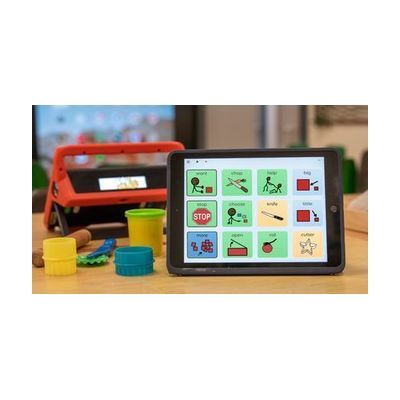
Grid for Schools is a school-wide AAC package that pairs Grid communication software with training, resources, and specialist support. Students can communicate with symbols or text, using predictive text, sentence completion, and natural-sounding voices, and they can access it by touch, pointer, switch, or eye gaze. It includes ready-made and customizable grid sets for school subjects, a five-step training plan, and guidance on implementation and goal setting. This is a whole-school program rather than a single device, so plan on working with the Smartbox team and your school's specialists to roll it out.
Getting it
Many states lend devices like this for trial periods, free or at low cost — find your state's AT lending program.
Where to get it
This is the vendor WhatCanHelp tracks for this product — it may also be available from other retailers or a local supplier, and prices vary.
How to fund this
These are common places to ask about paying for equipment like this. Each one decides its own eligibility and what it covers, so start by asking them.
Details
Quick Facts Catalog facts · auto-generated
- Platform
- Age range
- Complexity
- Professional setup required
- Price
- Funding
- Medicaid waiver
- Out of pocket
- School district
- Vocational rehab
What setup looks like
- Out of the box
Once Grid is installed on a student's device, symbol and text communication grids can be opened and tried right away. - With a guide
- Work through the five-step training plan with your school team to learn the software and plan rollout.
- Customize the ready-made grid sets for your school's subjects, routines, and each student's vocabulary.
- Expect several sessions over time to get a classroom comfortable, not a single sitting. See manufacturer support resources for detailed instructions.
- With professional help
- A speech-language pathologist (SLP) or AAC specialist should assess each student's communication needs and pick the right access method (touch, switch, pointer, or eye gaze).
- The SLP, an occupational therapist (OT), or an assistive technology professional (ATP) sets up access, positioning, and vocabulary, then sets goals with the team. Plan for ongoing follow-up through implementation. See manufacturer support resources for detailed instructions.
Compare & explore
Sources & fine print
Vendor facts (name, price, platforms, vendor link) sourced from Smartbox — view on vendor site (opens in a new tab); last checked October 31, 2026.
Classification & description AI-generated from vendor-published content on October 1, 2026 · confidence: high. Vendor specs may lag; verify before relying on details in a clinical or funding artifact.