Browse Assistive Technology
Products
-
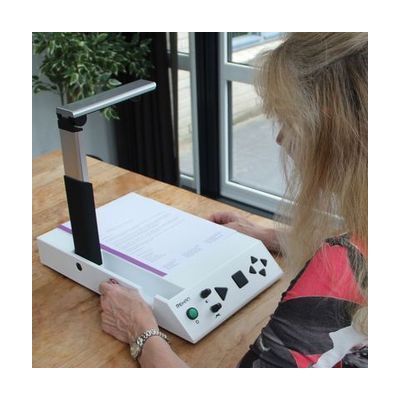
i-Reader 2 Desktop Scanner
$1,999.00
The i-Reader 2 is a desktop scanner that reads a full letter-size printed page aloud. You place the page on it, it scans the text, and a natural-sounding voice reads it back. You can pick a male or female voice and one of twelve languages, and change the reading speed and volume. It also connects to a monitor by VGA or HDMI, so you can see the scanned page with each word highlighted as it is spoken. That helps if you read along with the voice. It runs on AC power and comes with a carrying case.
Verified 2 days agoSetup with instructions -
ChromeVox
Free
ChromeVox is the screen reader built into ChromeOS. It reads what is on a Chromebook screen out loud, so someone who can't see the display well can still move through apps, menus, and web pages. It comes with the Chromebook, so there is nothing to buy or install. Chromebook accessibility settings can sync across your devices when you sign in to your Google Account, which saves you from setting them up again on a new machine or after a reset. The page for this product mostly covers Chromebook accessibility settings in general, so check the ChromeVox help pages for the exact keyboard commands and options.
Verified 4 days agoSetup with instructions -
Fusion Home
$187 every year
Windows software that combines the ZoomText screen magnifier with the JAWS screen reader in a single install. Someone whose vision changes over time, or who uses magnification some days and speech on others, can move between enlarged, enhanced visuals and spoken output without switching programs. This is the Home edition, a personal-use license, so it suits an individual at home rather than a workplace deployment.
Verified 5 days agoProfessional guidance helps -
TalkBack
Free
TalkBack is the screen reader built into Android devices. It speaks what is on the screen aloud, so someone who can't see the display well can control the phone or tablet without looking at it. It is meant for people who are blind or have low vision. When you turn it on for the first time, a tutorial opens to teach the gestures, and you can reopen it later. Exact steps and some gestures vary by device maker, Android version, and TalkBack version.
Verified 4 days agoSetup with instructions -
JAWS Home
$104.50 every year
JAWS Home is a screen reader for Windows PCs that reads on-screen content aloud and can send it to a braille display, so someone who can't see the screen or use a mouse can still work in their applications. It runs entirely from the keyboard. This is the home-use edition, priced as a per-user software license rather than a workplace or network package.
Verified 5 days agoProfessional guidance helps -
Orca Screen Reader
Free
Orca is a free, open-source screen reader for Linux desktops that use GNOME. It reads what is on the screen aloud, can send text to a braille display, and can enlarge the screen, so someone who is blind or has low vision can work on their computer. It comes built into most Linux distributions, including Ubuntu, Fedora, and Debian. You'll want to learn your desktop's own navigation commands too, since Orca works alongside them.
Verified 4 days agoSetup with instructions -

VoiceOver
Free
VoiceOver is the screen reader built into Apple devices. It speaks what's on the screen out loud, sends it to a braille display, or does both, so someone who can't see the screen can still use their device. You move around with gestures on a touchscreen or trackpad, or with a Bluetooth keyboard. You can adjust the voice, speaking speed, how much detail it gives, and the sounds and haptic (vibration) feedback. It can also describe images and screen elements, even in apps and web pages that don't label them, and it can describe things the camera sees, like people, doors, text, and furniture. Some features are not offered in every region or language.
Verified 4 days agoSetup with instructions -

FS Student Suite
$225 every year
The FS Student Suite is a one-year license for students who need to see or hear their computer screen. It lets you install JAWS (a screen reader that reads the screen aloud), ZoomText (screen magnification), or Fusion, which combines the two. The license covers every upgrade and update released during the license term, so the software stays current for the school year. This is a software license only, so you'll need a Windows computer to run it, and the license runs for one year.
Verified 5 days agoSetup with instructions -
ReadDesk
$895.00
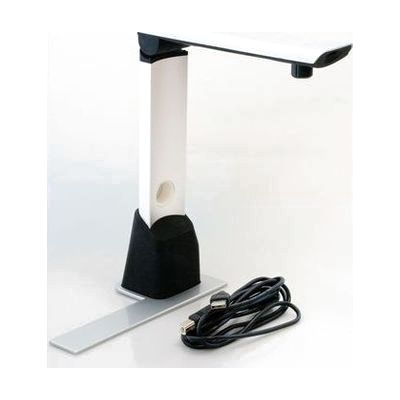
The ReadDesk is a small desktop camera that connects to a Windows computer and shows whatever you place under it, enlarged, on the screen. It also has OCR, which reads printed text aloud, so it can speak books, newspapers, bills, and prescription labels in a natural-sounding voice. Colors, views, speech, and other settings can be adjusted to suit the reader. It weighs about 1.5 pounds, so it is easy to move or store, but it only works with a computer; there is no screen of its own.
Verified yesterdaySetup with instructions -
Fusion Professional
$1,412 every year
Windows software that pairs the ZoomText screen magnifier with the JAWS screen reader in one installation. Someone whose vision changes over time, or who wants to see enlarged text on screen and also hear it read aloud, can move between the two modes without running separate programs. It is aimed at a wide range of vision loss, from low vision through blindness. This is the Professional license, which is priced for individual and workplace use.
Verified 5 days agoProfessional guidance helps -
Windows Narrator
Free
Narrator is the screen reader that comes built into Windows 11, so there is nothing to download or install. It reads aloud what is on the screen, which lets someone who can't see the display use apps, browse the web, and move around Windows. You can adjust how fast it speaks and how loud it is, and it has a scan mode for moving through apps, email, and web pages. Microsoft publishes a full guide to Narrator, in Word and PDF versions in English, plus separate how-to articles for the Start menu, Settings, File Explorer, Office apps, and Teams. Screen readers take practice, so plan on some time with the guide before it feels natural.
Verified 4 days agoSetup with instructions -

Prodigi for Windows
$995.00
Prodigi for Windows is software that puts magnification, text-to-speech, and document access together in one program for people with low vision who use a Windows computer. It is meant to make everyday computer use and reading easier on screen. Because it runs on your own PC, you get a software solution rather than a separate dedicated device, so the computer you already use is part of the setup.
Not recently verifiedSetup with instructions -
NVDA (NonVisual Desktop Access)
Free
NVDA is a free screen reader for Windows. It reads aloud what is on the screen so someone who is blind or has low vision can use the operating system and many other programs. It installs quickly and can also run from a USB stick, which helps if you need to use a computer that isn't your own. It comes in many languages, and an active user community builds add-ons that extend what it can do. Screen readers take practice to use well, so plan on some learning time even though the software itself is simple to get.
Verified 4 days agoSetup with instructions -
JAWS Professional
$1,003 every year
JAWS is screen reader software for Windows that reads on-screen content aloud and can send it to a braille display, so someone who can't see the screen or use a mouse can work in their applications from the keyboard. It's built for people with significant vision loss, including blind users who depend on it for daily computer use. The Professional edition is the workplace-oriented licence. It is software only, and anyone who wants braille output will need to add a compatible display.
Verified 5 days agoProfessional guidance helps -
Fusion Suite
$225.00
Fusion Suite pairs two Windows tools in one package: ZoomText, which enlarges and enhances what's on screen, and JAWS, which reads the screen aloud. That makes it a good fit for someone with low vision who wants to see as much as they can but also needs speech support when their eyes tire or the text is too small to follow. You get a one-year license with two activations, so it can run on a home computer and a school computer. It only works on Windows, and the license has to be renewed after the year.
Verified 3 days agoSetup with instructions -

BrailleNote evolve: KeySoft on Windows 11
The BrailleNote evolve is a braille notetaker that runs two environments on one device: HumanWare's KeySoft, built for reading and writing in braille, and Windows 11 Pro. It comes with the NVDA screen reader and Microsoft 365, so someone who is blind can write, read, and work on shared documents using braille. You get a notetaker and a Windows computer in one dedicated device, which suits a student or worker who needs to use mainstream software without sight. Choosing it well takes some thought, because it replaces more than one device and the best fit depends on how the person already works.
Not recently verifiedProfessional guidance helps -
Select-to-speak for Chromebook
Free
Select-to-speak is a text-to-speech tool built into every Chromebook. You pick the text you want, and the Chromebook reads it aloud while highlighting each word as it goes. You can shade the rest of the screen to help your eyes stay on the words, pause the reading, skip lines, and change the speed. It also lets you choose the voice and language, so it works for someone who finds reading on screen tiring or who learns better by listening as well as seeing the words. It only works on a Chromebook, so it won't help on other kinds of computers.
Verified 4 days agoSetup with instructions