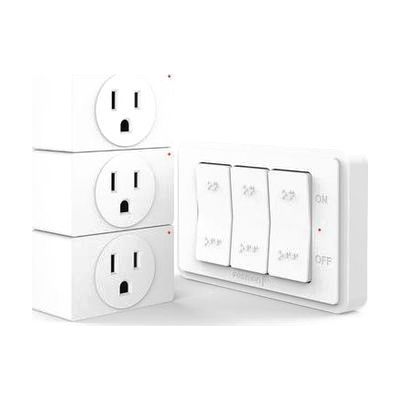
WavePoint Wireless Outlet Plug with 3-Button- white
by Fosmon
Last verified July 29, 2026 · classified April 26, 2026
What it is
Summary
AI-generated from vendor-published content · April 26, 2026
This system lets you turn plugged-in devices on or off from across the room without touching the outlet — you plug wireless receiver modules into your wall outlets, then use a 3-button remote to control each one independently. It's designed for someone who has difficulty reaching outlets behind furniture, bending down, or physically manipulating plugs due to limited mobility or dexterity, and the remote includes Braille markings making it usable without sight. The package is a complete, ready-to-use system: three outlet receivers and a wall-mountable 3-button remote that can be placed wherever is most convenient, including stuck to a wall near a bed or wheelchair. The range is rated to 80 feet through walls, but the remote uses RF rather than app-based control, so there's no smartphone required — just simple on/off switching with no smart-home setup.
Quick Facts Catalog facts · auto-generated
- AT Act lending
- Medicaid waiver
- Out of pocket
What Setup Looks Like
- Out of the box
- Plug each receiver module into a standard wall outlet.
- Press the pairing button on each receiver to sync it with the corresponding button on the remote — takes about a minute per outlet.
- Use the remote buttons to toggle each outlet on or off from anywhere in range.
- With a guide
- Mount the remote's wall plate bracket in an accessible location (beside a bed, at wheelchair height) using the included hardware.
- Review pairing instructions to assign individual outlets to specific buttons or group them for simultaneous control — full setup typically under 15 minutes.
Getting it
Try Before You Buy
Devices like this are often available to borrow through your state's AT Act program — typically free or low-cost — so you can try it before buying or pursuing funding.
Where to Get It
This is the vendor WhatCanHelp tracks for this product — it may also be available from other retailers or a local supplier, and prices vary.
Some links may be affiliate links — WhatCanHelp may earn a small commission from purchases at no extra cost to you. More on affiliates →
As an Amazon Associate we earn from qualifying purchases.
How to Fund This
Equipment like this is often pursued through official state programs. These are common starting points — each program decides its own eligibility and what it covers, so the first step is always a phone call.
Compare & explore
Sources & fine print
Vendor facts (name, price, platforms, vendor link) sourced from Fosmon — view on vendor site; last verified July 29, 2026.
Classification & description AI-generated from vendor-published content on April 26, 2026 · confidence: high. Vendor specs may lag; verify before relying on details in a clinical or funding artifact.