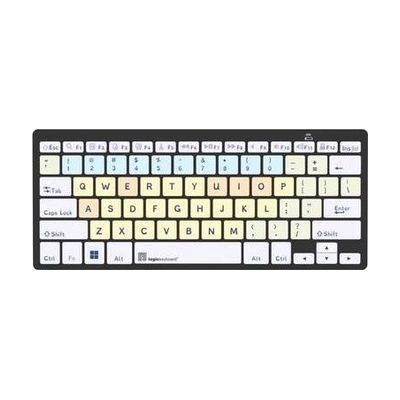
Dyslexie - PC Bluetooth Mini Keyboard
Price is what the vendor listed when last checked. Confirm it with the vendor before buying.
Last verified September 18, 2026 · classified April 26, 2026
What it is
Summary
AI-generated from vendor-published content · April 26, 2026
This compact Bluetooth keyboard uses the Dyslexie typeface — a font specifically designed to reduce letter confusion common in dyslexia by giving each character a distinct, weighted base — printed on every key. The keys are also color-coded by category (vowels, consonants, numbers, function keys), which helps users build a mental map of the keyboard layout rather than hunting for letters. It's a complete, self-contained input device that pairs wirelessly via Bluetooth — no additional software or font installation required on the host computer for the physical keyboard itself, though installing the Dyslexie font in your apps would extend the benefit to screen text. This is a mini keyboard, so the key spacing is more compact than a standard full-size board, which may take some adjustment.
Quick Facts Catalog facts · auto-generated
- AT Act lending
- Out of pocket
- School district
- Vocational rehab
What Setup Looks Like
- Out of the box
- Power on the keyboard and put it in Bluetooth pairing mode.
- Pair it with your PC via Windows Bluetooth settings — the keyboard is ready to type once connected.
- With a guide
If using with a child in a school setting, consider also installing the Dyslexie font on the computer so on-screen text matches the keyboard keycaps. See manufacturer support resources for detailed instructions.
Getting it
Try Before You Buy
Devices like this are often available to borrow through your state's AT Act program — typically free or low-cost — so you can try it before buying or pursuing funding.
Where to Get It
This is the vendor WhatCanHelp tracks for this product — it may also be available from other retailers or a local supplier, and prices vary.
Some links may be affiliate links — WhatCanHelp may earn a small commission from purchases at no extra cost to you. More on affiliates →
As an Amazon Associate we earn from qualifying purchases.
How to Fund This
Equipment like this is often pursued through official state programs. These are common starting points — each program decides its own eligibility and what it covers, so the first step is always a phone call.
Compare & explore
Sources & fine print
Vendor facts (name, price, platforms, vendor link) sourced from LogicKeyboard — view on vendor site; last verified September 18, 2026.
Classification & description AI-generated from vendor-published content on April 26, 2026 · confidence: high. Vendor specs may lag; verify before relying on details in a clinical or funding artifact.