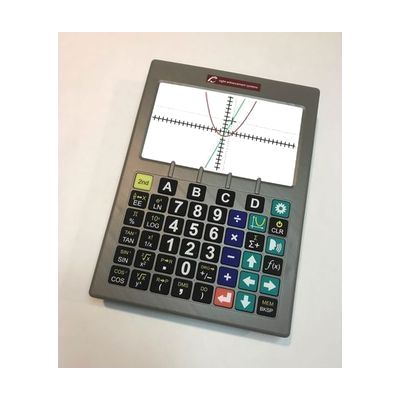
SciPlus 3500 -Talking Graphing Calculator
by SciPlus
Price is what the vendor listed when last checked. Confirm it with the vendor before buying.
Last verified September 19, 2026 · classified April 26, 2026
What it is
Summary
AI-generated from vendor-published content · April 26, 2026
The SciPlus 3500 is a standalone graphing calculator built specifically for people with low vision, combining a large 7-inch high-contrast color display with full speech output so users can hear calculations and graph results read aloud through included earbuds. The oversized tactile keys and multiple high-contrast color modes (white on black, yellow on black, etc.) make it usable for someone who struggles with the tiny buttons and small screens of standard scientific calculators. This is a complete, self-contained device — no computer, software, or additional hardware required — supporting scientific, statistical, trigonometric, and graphing functions at a level appropriate for secondary school through college coursework. It's a specialized device at a premium price, so students should confirm it's permitted on standardized exams before relying on it as their primary calculator.
Quick Facts Catalog facts · auto-generated
- AT Act lending
- Out of pocket
- School district
- Vocational rehab
What Setup Looks Like
- Out of the box
- Charge the device using the included USB charger before first use.
- Power on and begin entering calculations — speech output activates automatically through the built-in speaker or included earbuds.
- With a guide
- Review the product manual to configure preferred high-contrast display mode and adjust backlight to your environment.
- Practice navigating graphing and function-evaluation features using the manual's step-by-step examples — expect 30–60 minutes to become comfortable with the graphing workflow. See manufacturer support resources for detailed instructions.
Getting it
Try Before You Buy
Devices like this are often available to borrow through your state's AT Act program — typically free or low-cost — so you can try it before buying or pursuing funding.
Where to Get It
This is the vendor WhatCanHelp tracks for this product — it may also be available from other retailers or a local supplier, and prices vary.
Some links may be affiliate links — WhatCanHelp may earn a small commission from purchases at no extra cost to you. More on affiliates →
As an Amazon Associate we earn from qualifying purchases.
How to Fund This
Equipment like this is often pursued through official state programs. These are common starting points — each program decides its own eligibility and what it covers, so the first step is always a phone call.
Compare & explore
Sources & fine print
Vendor facts (name, price, platforms, vendor link) sourced from SciPlus — view on vendor site; last verified September 19, 2026.
Classification & description AI-generated from vendor-published content on April 26, 2026 · confidence: high. Vendor specs may lag; verify before relying on details in a clinical or funding artifact.