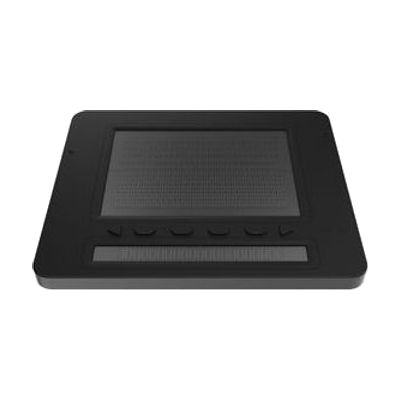
Dot Pad Tactile Graphics Display
by LS&S
Last verified July 26, 2026 · classified April 26, 2026
What it is
Summary
AI-generated from vendor-published content · April 26, 2026
The Dot Pad is a refreshable tactile display that converts on-screen graphics, charts, maps, and images into a physical raised-pin surface that a blind user can read with their fingers — in real time. It's designed for someone who is blind or has significant vision loss and needs to access visual content like graphs, diagrams, or drawings that traditional screen readers simply describe rather than represent spatially. The device includes a 300-cell graphics area (30 columns by 10 rows of eight-pin cells) plus a separate 20-cell Braille text line, connects via Bluetooth to iOS or Windows devices, and works alongside VoiceOver or the companion Dot Canvas app. At nearly $6,000, this is a significant investment, and getting the most out of it typically requires familiarity with refreshable Braille displays and some learning curve around how different content types render tactilely.
Quick Facts Catalog facts · auto-generated
- AT Act lending
- Medicaid waiver
- Out of pocket
- School district
- Vocational rehab
What Setup Looks Like
- Out of the box
Power on the Dot Pad — the tactile pins are active and the physical display works without pairing. - With a guide
- Pair the Dot Pad to an iOS or Windows device via Bluetooth.
- Enable VoiceOver (iOS) or configure the device as a Braille display in your screen reader (Windows).
- Download the Dot Canvas app to create and send custom tactile drawings to the display.
- Expect 30–60 minutes to complete initial pairing and test basic graphic rendering. See manufacturer support resources for detailed instructions.
- With professional help
- An assistive technology professional (ATP) or vision rehabilitation therapist (VRT) can help configure the display within a student's or user's existing AT workflow (screen reader settings, educational software integration).
- For school or vocational settings, an AT specialist can map the display to accessible STEM or mapping content — plan for 2–4 sessions over several weeks for productive workflow integration.
Getting it
Try Before You Buy
Devices like this are often available to borrow through your state's AT Act program — typically free or low-cost — so you can try it before buying or pursuing funding.
Where to Get It
This is the vendor WhatCanHelp tracks for this product — it may also be available from other retailers or a local supplier, and prices vary.
Some links may be affiliate links — WhatCanHelp may earn a small commission from purchases at no extra cost to you. More on affiliates →
As an Amazon Associate we earn from qualifying purchases.
How to Fund This
Equipment like this is often pursued through official state programs. These are common starting points — each program decides its own eligibility and what it covers, so the first step is always a phone call.
Compare & explore
Sources & fine print
Vendor facts (name, price, platforms, vendor link) sourced from LS&S — view on vendor site; last verified July 26, 2026.
Classification & description AI-generated from vendor-published content on April 26, 2026 · confidence: high. Vendor specs may lag; verify before relying on details in a clinical or funding artifact.