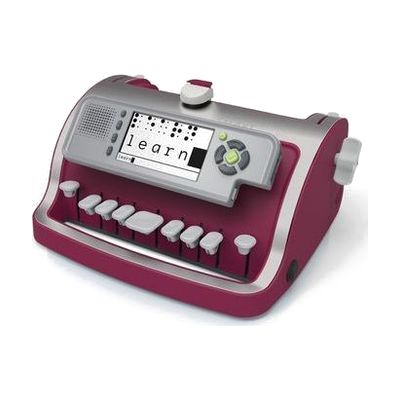
Perkins SMART Brailler
Price is what the vendor listed when last checked. Confirm it with the vendor before buying.
Last verified September 19, 2026 · classified April 26, 2026
What it is
Summary
AI-generated from vendor-published content · April 26, 2026
The Perkins SMART Brailler is an electric braille writer that embosses braille onto paper while simultaneously displaying what's being typed on a small LCD screen and reading it aloud through a built-in speaker. It's designed for students who are blind or have low vision who are learning braille, with the screen and audio feedback making it possible for sighted teachers and parents to follow along without knowing braille themselves. You get a complete standalone device — mechanical braille writing, audio feedback, a visual display, and USB document transfer are all built in, so no additional software or tablet is required. At over 8 pounds and sized for standard letter paper, this is a desktop learning tool rather than something to carry around, and the recommended 90 lb paper stock is heavier than typical printer paper, so you'll need to source that separately.
Quick Facts Catalog facts · auto-generated
- AT Act lending
- Out of pocket
- School district
- Vocational rehab
What Setup Looks Like
- Out of the box
Insert paper and begin typing braille keys — the machine embosses, displays, and speaks each character immediately. - With a guide
- Download the Quick Start Guide from the manufacturer to configure voice settings (male/female) and volume.
- Connect via USB to a computer to transfer or save electronic documents — allow 15–30 minutes to set up file transfer with the guide.
- With professional help
- A teacher of the visually impaired (TVI) or orientation and mobility specialist should introduce braille concepts and correct finger positioning before extended independent use.
- Expect integration into a formal braille literacy program over weeks to months for meaningful skill development. See manufacturer support resources for detailed instructions.
Getting it
Try Before You Buy
Devices like this are often available to borrow through your state's AT Act program — typically free or low-cost — so you can try it before buying or pursuing funding.
Where to Get It
This is the vendor WhatCanHelp tracks for this product — it may also be available from other retailers or a local supplier, and prices vary.
Some links may be affiliate links — WhatCanHelp may earn a small commission from purchases at no extra cost to you. More on affiliates →
As an Amazon Associate we earn from qualifying purchases.
How to Fund This
Equipment like this is often pursued through official state programs. These are common starting points — each program decides its own eligibility and what it covers, so the first step is always a phone call.
Compare & explore
Sources & fine print
Vendor facts (name, price, platforms, vendor link) sourced from Perkins Solutions — view on vendor site; last verified September 19, 2026.
Classification & description AI-generated from vendor-published content on April 26, 2026 · confidence: high. Vendor specs may lag; verify before relying on details in a clinical or funding artifact.