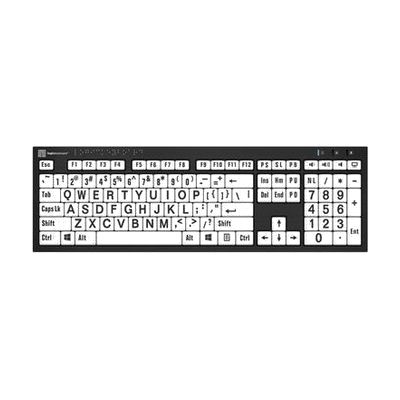
Large Print Keyboard with Braille
by LS&S
Last verified June 18, 2026 · classified May 9, 2026
What it is
Summary
AI-generated from vendor-published content · May 9, 2026
A full-size USB wired keyboard that combines large-print, high-contrast key labels with permanently molded braille characters — useful for people who are blind or have low vision, and also for sighted users learning braille alongside a screen reader. The braille dots are part of the key material itself, not adhesive overlays, so they won't wear off or peel with extended use. This is a plug-and-play peripheral for Windows 10/11 machines; it includes two built-in USB 2.0 ports for connecting additional accessories like a mouse or lamp. Windows-only is a real limitation — Mac and Linux users will need to look elsewhere — and it doesn't replace a screen reader or braille display, which most blind users will still need for meaningful computer access.
Quick Facts Catalog facts · auto-generated
- AT Act lending
- Out of pocket
- School district
- Vocational rehab
What Setup Looks Like
- Out of the box
Plug the USB cable into a Windows 10/11 computer — it's plug-and-play with no driver installation required. - With a guide
- If the keyboard is being used with a screen reader (e.g., JAWS, NVDA), install and configure that software separately.
- For braille learners, pair with a braille reference chart or tutorial resource to reinforce key positions — budget 1–2 hours for initial orientation to the layout.
Getting it
Try Before You Buy
Devices like this are often available to borrow through your state's AT Act program — typically free or low-cost — so you can try it before buying or pursuing funding.
Where to Get It
Some links may be affiliate links — WhatCanHelp may earn a small commission from purchases at no extra cost to you. More on affiliates →
How to Fund This
Equipment like this is often pursued through official state programs. These are common starting points — each program decides its own eligibility and what it covers, so the first step is always a phone call.
Compare & explore
Sources & fine print
Vendor facts (name, price, platforms, vendor link) sourced from LS&S — view on vendor site; last verified June 18, 2026.
Classification & description AI-generated from vendor-published content on May 9, 2026 · confidence: high. Vendor specs may lag; verify before relying on details in a clinical or funding artifact.