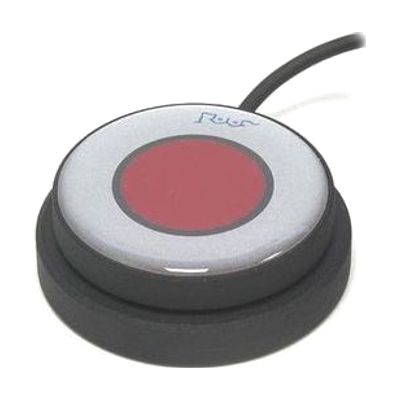
KajoButton Standard Switch
Price is what the vendor listed when last checked. Confirm it with the vendor before buying.
Last verified September 16, 2026 · classified April 26, 2026
What it is
Summary
AI-generated from vendor-published content · April 26, 2026
The KajoButton Standard Switch is a medium-sized physical button switch that sends an activation signal to compatible AT devices when pressed, giving both a click sound and tactile feedback so users know the press registered. It's well-suited for someone who needs a reliable access method for AAC devices, adapted toys, or environmental controls — particularly users with limited hand control who can work with a roughly 50mm target area. The switch connects via a standard 3.5mm mono jack and comes with a 150cm cable, but it is only the access point — you'll need a separate switch-compatible device (communication aid, switch-adapted toy, computer interface, etc.) to actually use it. Inclusive Technology is a well-regarded UK AT manufacturer, so build quality is solid, but note this is the 'standard' size in their KajoButton line, so if the user needs a significantly larger or smaller target, check whether other sizes in the range are a better fit.
Quick Facts Catalog facts · auto-generated
- AT Act lending
- Medicaid waiver
- Out of pocket
- School district
- Vocational rehab
What Setup Looks Like
- Out of the box
Plug the 3.5mm jack into a compatible switch input port on your AT device — the switch is ready to use immediately. - With a guide
- Position the switch where the user can most reliably activate it — a flat surface, tray, or mounting arm.
- Connect to the target AT device and test activation to confirm tactile and auditory feedback is working as expected.
- Adjust cable routing to prevent tangles or accidental disconnection during use. (Allow 10–15 minutes for initial positioning trial.)
- With professional help
- An occupational therapist (OT) or assistive technology professional (ATP) should assess the user's motor access site (hand, fist, elbow, etc.) and confirm a 50mm target is appropriate before purchasing.
- If integrating with AAC or scanning software, an SLP or ATP will need to configure scanning settings on the target device. Expect 1–2 sessions for access method trials and setup.
Getting it
Try Before You Buy
Devices like this are often available to borrow through your state's AT Act program — typically free or low-cost — so you can try it before buying or pursuing funding.
Where to Get It
This is the vendor WhatCanHelp tracks for this product — it may also be available from other retailers or a local supplier, and prices vary.
Some links may be affiliate links — WhatCanHelp may earn a small commission from purchases at no extra cost to you. More on affiliates →
As an Amazon Associate we earn from qualifying purchases.
How to Fund This
Equipment like this is often pursued through official state programs. These are common starting points — each program decides its own eligibility and what it covers, so the first step is always a phone call.
Compare & explore
Sources & fine print
Vendor facts (name, price, platforms, vendor link) sourced from Inclusive Technology — view on vendor site; last verified September 16, 2026.
Classification & description AI-generated from vendor-published content on April 26, 2026 · confidence: high. Vendor specs may lag; verify before relying on details in a clinical or funding artifact.