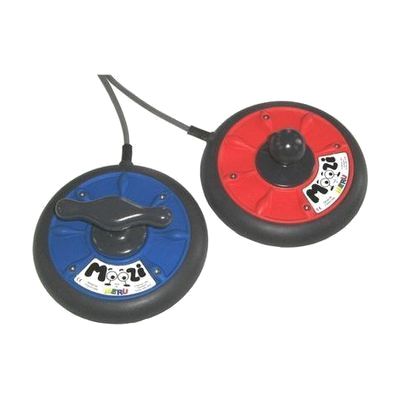
Moozi
Price is what the vendor listed when last checked. Confirm it with the vendor before buying.
Last verified September 16, 2026 · classified April 26, 2026
What it is
Summary
AI-generated from vendor-published content · April 26, 2026
The Moozi is a low-profile joystick designed to control power wheelchairs and switch-accessible devices with minimal hand or arm effort. It's built for people who have limited range of motion, weakness, or fatigue that makes a standard joystick difficult to use — the low-profile design reduces the amount of movement required to drive or activate a device. The base connects to wheelchairs using a standard 9-pin D-connector (compatible with Dynamic DX Masterswitch systems) and can also interface with computers as a mouse replacement with an appropriate adaptor, so this is a component that requires a compatible wheelchair or switch interface to function. Handle styles can be swapped out — mushroom, T-bar, or cow horn — to suit different hand positions and grip abilities, but note that Moozi is currently available to UK customers only.
Quick Facts Catalog facts · auto-generated
- AT Act lending
- Medicaid waiver
- Out of pocket
- Vocational rehab
What Setup Looks Like
- With a guide
- Select the appropriate handle style (mushroom, T-bar, or cow horn) based on the user's grip and hand position.
- Attach the base to a wheelchair tray or tabletop using Velcro or similar fastening.
- Connect the 9-pin D-connector to the wheelchair's Dynamic DX Masterswitch port or use an adaptor for other switch-activated devices.
- Adjust position for comfort and test joystick response — allow 15–30 minutes for initial placement. See manufacturer support resources for detailed instructions.
- With professional help
- An occupational therapist (OT) or ATP should assess hand function and positioning needs to determine the correct handle style and mounting location.
- Wheelchair programming (sensitivity, throw distance) may need adjustment by a qualified technician or seating specialist.
- Allow 1–2 clinical sessions for fitting and trial, particularly if trialling via an assessment kit.
Getting it
Try Before You Buy
Devices like this are often available to borrow through your state's AT Act program — typically free or low-cost — so you can try it before buying or pursuing funding.
Where to Get It
This is the vendor WhatCanHelp tracks for this product — it may also be available from other retailers or a local supplier, and prices vary.
Some links may be affiliate links — WhatCanHelp may earn a small commission from purchases at no extra cost to you. More on affiliates →
As an Amazon Associate we earn from qualifying purchases.
How to Fund This
Equipment like this is often pursued through official state programs. These are common starting points — each program decides its own eligibility and what it covers, so the first step is always a phone call.
Compare & explore
Sources & fine print
Vendor facts (name, price, platforms, vendor link) sourced from Inclusive Technology — view on vendor site; last verified September 16, 2026.
Classification & description AI-generated from vendor-published content on April 26, 2026 · confidence: high. Vendor specs may lag; verify before relying on details in a clinical or funding artifact.