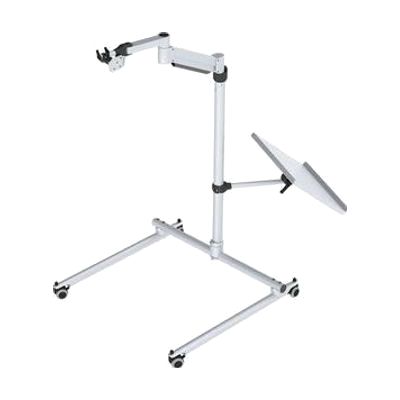
REHAdapt OneHand Floor Stand
by REHAdapt
Price is what the vendor listed when last checked. Confirm it with the vendor before buying.
Last verified September 16, 2026 · classified May 9, 2026
What it is
Summary
AI-generated from vendor-published content · May 9, 2026
A heavy-duty floor stand designed to hold AAC devices, touch monitors, or laptop-connected communication systems in place of a desk or table mount. The OneHand arm system lets you reposition the device quickly without tools or loosening bolts — useful in therapy sessions where orientation needs to change frequently between clinician and client. The integrated laptop shelf means this can support setups where the AAC device runs off a connected computer, rather than being a standalone unit. Two important things to know before ordering: the mounting plate is sold separately (you'll need to confirm REHAdapt compatibility with your specific device), and the maximum height caps at 120cm — roughly wheelchair lap height — which may not reach high enough for some standing or elevated seating positions.
Quick Facts Catalog facts · auto-generated
- AT Act lending
- Medicaid waiver
- Out of pocket
- School district
- Vocational rehab
What Setup Looks Like
- Out of the box
Unfold and lock the base for stability — the stand is self-supporting once assembled. - With a guide
- Attach the compatible REHAdapt mounting plate (purchased separately) to your device.
- Attach the mounted device to the OneHand arm and adjust arm position to the desired height and angle — no tools required.
- Position laptop on integrated shelf if needed and route cables. Expect 15–30 minutes for initial setup. See manufacturer support resources for detailed instructions.
- With professional help
- An ATP or OT should assess optimal device positioning relative to the user's seating system before finalizing arm configuration.
- Correct height, angle, and reach distance affect access method effectiveness — budget one session for positioning trials.
Getting it
Try Before You Buy
Devices like this are often available to borrow through your state's AT Act program — typically free or low-cost — so you can try it before buying or pursuing funding.
Where to Get It
This is the vendor WhatCanHelp tracks for this product — it may also be available from other retailers or a local supplier, and prices vary.
Some links may be affiliate links — WhatCanHelp may earn a small commission from purchases at no extra cost to you. More on affiliates →
As an Amazon Associate we earn from qualifying purchases.
How to Fund This
Equipment like this is often pursued through official state programs. These are common starting points — each program decides its own eligibility and what it covers, so the first step is always a phone call.
Compare & explore
Sources & fine print
Vendor facts (name, price, platforms, vendor link) sourced from REHAdapt — view on vendor site; last verified September 16, 2026.
Classification & description AI-generated from vendor-published content on May 9, 2026 · confidence: high. Vendor specs may lag; verify before relying on details in a clinical or funding artifact.