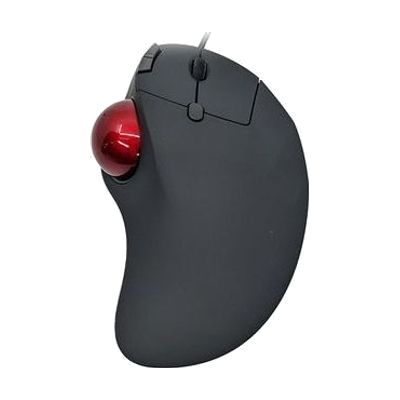
Accuratus Trackball Mouse
by Accuratus
Price is what the vendor listed when last checked. Confirm it with the vendor before buying.
Last verified September 16, 2026 · classified April 26, 2026
What it is
Summary
AI-generated from vendor-published content · April 26, 2026
A trackball mouse where the cursor is moved by rolling a large 4.4cm ball with the thumb rather than moving the entire mouse across a desk. This is useful for people who find it painful or difficult to move their whole hand and wrist — such as those with repetitive strain injury, arthritis, limited arm range of motion, or tremor — since the arm stays stationary during use. It comes in both wired and Bluetooth wireless versions, each with a scroll wheel and back/forward navigation buttons built in, and the wireless model recharges via USB-C. Worth noting: this is designed for right-hand use only, so left-handed users will need to look elsewhere.
Quick Facts Catalog facts · auto-generated
- AT Act lending
- Out of pocket
- Vocational rehab
What Setup Looks Like
- Out of the box
Plug in the USB cable (wired) or pair via Bluetooth, and the trackball is ready to use — no drivers required on most operating systems. - With a guide
- For Bluetooth pairing, activate the device's pairing mode and connect through your computer's Bluetooth settings — typically under 5 minutes.
- If cursor speed or sensitivity feels off, adjust pointer speed in your operating system's mouse settings. See manufacturer support resources for detailed instructions.
Getting it
Try Before You Buy
Devices like this are often available to borrow through your state's AT Act program — typically free or low-cost — so you can try it before buying or pursuing funding.
Where to Get It
This is the vendor WhatCanHelp tracks for this product — it may also be available from other retailers or a local supplier, and prices vary.
Some links may be affiliate links — WhatCanHelp may earn a small commission from purchases at no extra cost to you. More on affiliates →
As an Amazon Associate we earn from qualifying purchases.
How to Fund This
Equipment like this is often pursued through official state programs. These are common starting points — each program decides its own eligibility and what it covers, so the first step is always a phone call.
Compare & explore
Sources & fine print
Vendor facts (name, price, platforms, vendor link) sourced from Accuratus — view on vendor site; last verified September 16, 2026.
Classification & description AI-generated from vendor-published content on April 26, 2026 · confidence: high. Vendor specs may lag; verify before relying on details in a clinical or funding artifact.