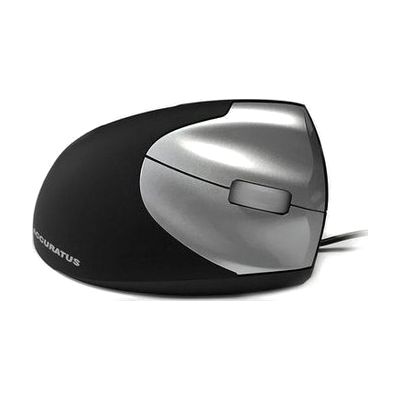
Accuratus Vertical Mouse
by Accuratus
Price is what the vendor listed when last checked. Confirm it with the vendor before buying.
Last verified September 16, 2026 · classified April 26, 2026
What it is
Summary
AI-generated from vendor-published content · April 26, 2026
A vertical ergonomic mouse that holds your hand in a handshake-style upright position, which keeps the forearm in a more neutral rotation and reduces the twisting stress that a standard flat mouse places on the wrist and forearm. It's well-suited for someone experiencing wrist pain, early-stage RSI, carpal tunnel symptoms, or arm fatigue from extended computer use — or anyone trying to prevent those issues from developing. This is a complete, ready-to-use input device in both wired and wireless variants, with left- and right-handed options, and includes standard click buttons and scroll wheel — no additional software or configuration required. Vertical mice have a short learning curve, and some users find precise cursor control initially awkward compared to a conventional mouse; it may take a week or two to feel fully comfortable.
Quick Facts Catalog facts · auto-generated
- AT Act lending
- Out of pocket
- Vocational rehab
What Setup Looks Like
- Out of the box
- Plug in the wired version via USB — it will be recognized automatically by Windows or Mac with no drivers needed.
- For the wireless version, insert the included AAA batteries and connect the USB receiver to begin using immediately.
- With a guide
If wrist or arm pain persists after switching, an ergonomics guide can help adjust desk height, monitor position, and mouse placement for best results — most setups take under 30 minutes to optimize.
Getting it
Try Before You Buy
Devices like this are often available to borrow through your state's AT Act program — typically free or low-cost — so you can try it before buying or pursuing funding.
Where to Get It
This is the vendor WhatCanHelp tracks for this product — it may also be available from other retailers or a local supplier, and prices vary.
Some links may be affiliate links — WhatCanHelp may earn a small commission from purchases at no extra cost to you. More on affiliates →
As an Amazon Associate we earn from qualifying purchases.
How to Fund This
Equipment like this is often pursued through official state programs. These are common starting points — each program decides its own eligibility and what it covers, so the first step is always a phone call.
Compare & explore
Sources & fine print
Vendor facts (name, price, platforms, vendor link) sourced from Accuratus — view on vendor site; last verified September 16, 2026.
Classification & description AI-generated from vendor-published content on April 26, 2026 · confidence: high. Vendor specs may lag; verify before relying on details in a clinical or funding artifact.