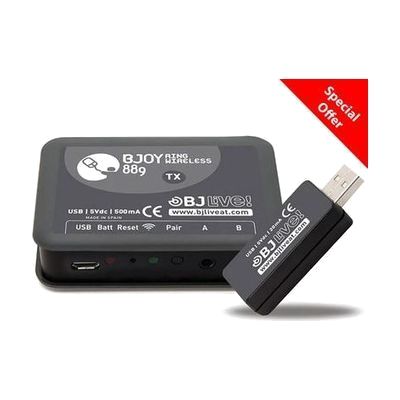
BJOY Ring Wireless
by BJOY
Last verified June 20, 2026 · classified April 26, 2026
What it is
Summary
AI-generated from vendor-published content · April 26, 2026
The BJOY Ring Wireless is an adapter that clamps onto a power wheelchair's joystick and converts it into a wireless mouse, letting the user control computers, tablets, and smartphones without any separate input device. It's designed for power wheelchair users who already operate a joystick daily and want to use that same familiar control to navigate their digital devices. The ring pairs wirelessly with up to four receivers, so the same joystick can control a work computer, a home tablet, and a phone without re-pairing each time — and two external switch inputs can be added for left click, right click, drag, and double-click functions. Meaningful use requires pairing external switches for clicking actions, and the BJOY Configuration Software is needed to calibrate speed, sensitivity, and joystick orientation to match the user's seating position and driving habits.
Quick Facts Catalog facts · auto-generated
- AT Act lending
- Medicaid waiver
- Out of pocket
- Vocational rehab
What Setup Looks Like
- Out of the box
- Attach the ring to the existing wheelchair joystick shaft — no tools or permanent modifications required.
- Plug the wireless receiver dongle into a USB port on the target device to establish the connection.
- With a guide
- Download and install the BJOY Configuration Software on a Windows PC.
- Use the software to set joystick orientation, cursor speed, sensitivity, and directional mode (4 or 8 directions) to match the user's positioning.
- Connect external switches to the two programmable inputs and assign click functions (left click, right click, drag, double-click) as needed.
- Pair additional receivers for secondary devices (tablet, phone) following the multi-device pairing instructions — allow 30–60 minutes for full configuration. See manufacturer support resources for detailed instructions.
- With professional help
- An assistive technology professional (ATP) or occupational therapist (OT) should assess the user's current joystick use, seating position, and range of motion before configuring orientation and sensitivity.
- The ATP can identify the most appropriate switch types for click inputs based on the user's motor abilities and mount them appropriately.
- Expect 1–2 sessions over one to two weeks for fitting, software configuration, and real-world testing.
Getting it
Try Before You Buy
Devices like this are often available to borrow through your state's AT Act program — typically free or low-cost — so you can try it before buying or pursuing funding.
Where to Get It
Some links may be affiliate links — WhatCanHelp may earn a small commission from purchases at no extra cost to you. More on affiliates →
As an Amazon Associate we earn from qualifying purchases.
How to Fund This
Equipment like this is often pursued through official state programs. These are common starting points — each program decides its own eligibility and what it covers, so the first step is always a phone call.
Compare & explore
Sources & fine print
Vendor facts (name, price, platforms, vendor link) sourced from BJOY — view on vendor site; last verified June 20, 2026.
Classification & description AI-generated from vendor-published content on April 26, 2026 · confidence: high. Vendor specs may lag; verify before relying on details in a clinical or funding artifact.