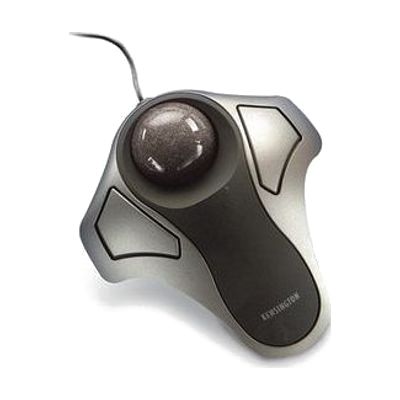
Kensington Orbit Optical Trackball
by Kensington
Price is what the vendor listed when last checked. Confirm it with the vendor before buying.
Last verified September 16, 2026 · classified April 26, 2026
What it is
Summary
AI-generated from vendor-published content · April 26, 2026
The Kensington Orbit is a stationary trackball where you roll a ball with your fingers or thumb to move the cursor, while the device itself stays completely still on the desk. It's well-suited for people who have limited arm or wrist mobility, pain from repetitive mouse movements, or tremors that make dragging a standard mouse difficult — because only the fingertips need to move. This is a plug-in USB device that works on its own without any software installation, connecting to Windows or Mac computers right away. The Orbit is a basic two-button trackball without a scroll wheel on some models, so users who rely heavily on scrolling may find it less convenient than higher-end trackballs in Kensington's lineup.
Quick Facts Catalog facts · auto-generated
- AT Act lending
- Out of pocket
- School district
- Vocational rehab
What Setup Looks Like
- Out of the box
Plug the USB cable into any available USB port on your PC or Mac — cursor control works immediately with no driver installation required. - With a guide
- Download optional Kensington Works software to customize button assignments or pointer speed if defaults aren't comfortable.
- Adjust system pointer settings (speed, acceleration) in your operating system's mouse/trackpad control panel to match your motor control needs — takes about 10–15 minutes.
Getting it
Try Before You Buy
Devices like this are often available to borrow through your state's AT Act program — typically free or low-cost — so you can try it before buying or pursuing funding.
Where to Get It
This is the vendor WhatCanHelp tracks for this product — it may also be available from other retailers or a local supplier, and prices vary.
Some links may be affiliate links — WhatCanHelp may earn a small commission from purchases at no extra cost to you. More on affiliates →
As an Amazon Associate we earn from qualifying purchases.
How to Fund This
Equipment like this is often pursued through official state programs. These are common starting points — each program decides its own eligibility and what it covers, so the first step is always a phone call.
Compare & explore
Sources & fine print
Vendor facts (name, price, platforms, vendor link) sourced from Kensington — view on vendor site; last verified September 16, 2026.
Classification & description AI-generated from vendor-published content on April 26, 2026 · confidence: high. Vendor specs may lag; verify before relying on details in a clinical or funding artifact.