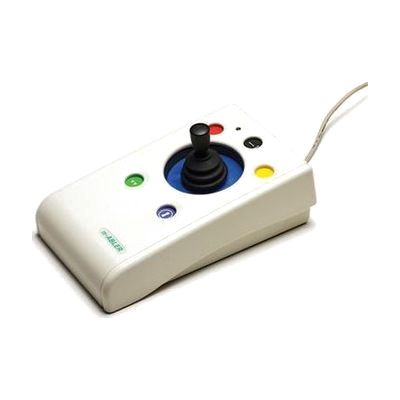
n-ABLER Joystick
by n-ABLER
Price is what the vendor listed when last checked. Confirm it with the vendor before buying.
Last verified September 16, 2026 · classified April 26, 2026
What it is
Summary
AI-generated from vendor-published content · April 26, 2026
The n-ABLER Joystick is a specialized mouse replacement that lets users control a computer cursor through a joystick handle rather than a conventional mouse, with built-in tremor filtering that smooths out involuntary hand movements across three sensitivity levels. It's designed for someone who has difficulty with the precise wrist and finger movements required to use a standard mouse — whether from conditions like Parkinson's, cerebral palsy, stroke, or MS. The package is a self-contained input device that plugs in via USB with no driver installation needed, and it works on Windows, Mac, and iOS/iPadOS; it does not require additional software or a separate controller box. The tremor filtering is useful but worth testing carefully — the right setting depends heavily on the individual's specific movement patterns, and what works well for one person may feel sluggish or unresponsive to another.
Quick Facts Catalog facts · auto-generated
- AT Act lending
- Medicaid waiver
- Out of pocket
- Vocational rehab
What Setup Looks Like
- Out of the box
- Plug the USB cable into your computer or use the included adapter for iPad/iPhone — cursor control works immediately with no driver installation.
- Try each of the three tremor filter settings to find the one that gives the smoothest cursor movement for your hand.
- With a guide
- Review the n-ABLER setup guide to configure button functions — left/right click toggle, double-click, and drag lock can be customized to match the user's needs.
- For iOS use, enable Switch Control in iPad/iPhone Accessibility settings and pair the joystick accordingly — allow 20–30 minutes with the Apple accessibility documentation. See manufacturer support resources for detailed instructions.
- With professional help
- An occupational therapist (OT) or assistive technology professional (ATP) can assess which handle grip (soft ball or T-bar) and tremor setting best matches the user's motor profile — recommended if the user has tried and struggled with other pointing devices.
- Expect 1–2 sessions to trial, configure, and train on the device for optimal results.
Getting it
Try Before You Buy
Devices like this are often available to borrow through your state's AT Act program — typically free or low-cost — so you can try it before buying or pursuing funding.
Where to Get It
This is the vendor WhatCanHelp tracks for this product — it may also be available from other retailers or a local supplier, and prices vary.
Some links may be affiliate links — WhatCanHelp may earn a small commission from purchases at no extra cost to you. More on affiliates →
As an Amazon Associate we earn from qualifying purchases.
How to Fund This
Equipment like this is often pursued through official state programs. These are common starting points — each program decides its own eligibility and what it covers, so the first step is always a phone call.
Compare & explore
Sources & fine print
Vendor facts (name, price, platforms, vendor link) sourced from n-ABLER — view on vendor site; last verified September 16, 2026.
Classification & description AI-generated from vendor-published content on April 26, 2026 · confidence: high. Vendor specs may lag; verify before relying on details in a clinical or funding artifact.