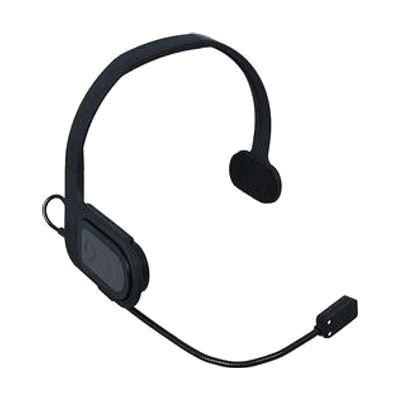
Quha Sento with Adjustable Headband
by Quha
Price is what the vendor listed when last checked. Confirm it with the vendor before buying.
Accessory or replacement part Made to go with another product — check it fits what you have.
Last verified September 16, 2026 · classified April 26, 2026
What it is
Summary
AI-generated from vendor-published content · April 26, 2026
The Quha Sento is a contactless puff switch — it detects the user's breath (a puff of air) to trigger click actions on a computer, without the user touching anything or placing anything in their mouth. It's designed for people who have very limited or no hand/arm movement and need a hands-free way to interact with a computer. Important to know up front: this is not a standalone product — it must be paired with the Quha Zono gyroscopic mouse (sold separately) to function, since the Sento handles click input while the Zono handles cursor movement. The adjustable headband version positions the sensor near the user's mouth, and because there's no internal mouthpiece, it can be shared between users in a school or therapy setting without hygiene concerns.
Quick Facts Catalog facts · auto-generated
- Medicaid waiver
- Out of pocket
- Vocational rehab
What Setup Looks Like
- Out of the box
Fit the adjustable headband and position the sensor near the user's mouth — no calibration tools required at this stage. - With a guide
- Pair the Sento with the Quha Zono or Zono 2 mouse following the manufacturer's pairing instructions.
- Adjust sensitivity settings to match the user's puff strength and breath pattern — allow 15–30 minutes for initial tuning. See manufacturer support resources for detailed instructions.
- With professional help
- An occupational therapist (OT) or assistive technology professional (ATP) should assess head positioning, breath control, and whether this switch site is appropriate before purchase.
- An ATP can configure the Sento/Zono combination for the user's specific access method (single puff, dual puff) and integrate it with the user's software environment.
- Expect 2–4 sessions over 2–4 weeks for initial setup, training, and refinement.
Getting it
Many states lend devices like this for free trial periods — find your state's AT lending program.
Where to Get It
This is the vendor WhatCanHelp tracks for this product — it may also be available from other retailers or a local supplier, and prices vary.
Some links may be affiliate links — WhatCanHelp may earn a small commission from purchases at no extra cost to you. More on affiliates →
As an Amazon Associate we earn from qualifying purchases.
How to Fund This
Equipment like this is often pursued through official state programs. These are common starting points — each program decides its own eligibility and what it covers, so the first step is always a phone call.
Compare & explore
Sources & fine print
Vendor facts (name, price, platforms, vendor link) sourced from Quha — view on vendor site; last verified September 16, 2026.
Classification & description AI-generated from vendor-published content on April 26, 2026 · confidence: high. Vendor specs may lag; verify before relying on details in a clinical or funding artifact.