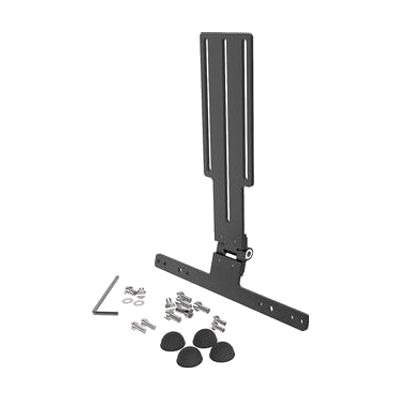
REHAdapt Eye Gaze Bracket
by REHAdapt
Price is what the vendor listed when last checked. Confirm it with the vendor before buying.
Accessory or replacement part Made to go with another product — check it fits what you have.
Last verified September 16, 2026 · classified April 26, 2026
What it is
Summary
AI-generated from vendor-published content · April 26, 2026
This is a mechanical mounting bracket designed to hold an eye gaze tracker in a fixed, adjustable position alongside a tablet, typically on a wheelchair or positioning system. It's intended for people who use eye gaze technology as their primary method of controlling a device or communicating — where the precise, stable angle of the tracker relative to the user's eyes is critical for reliable tracking accuracy. The bracket integrates with REHAdapt's own tablet mounting ecosystem (UDS and SLS systems), so it works as an add-on to an existing REHAdapt mount rather than a standalone solution — you'll need a compatible REHAdapt tablet holder, the eye gaze tracker itself, and likely a tablet or dedicated AAC device to complete the setup. The lockable hinge is the key functional feature: it lets you dial in the correct position and lock it there so the tracker doesn't drift, but getting that position right typically requires professional mounting assessment.
Quick Facts Catalog facts · auto-generated
- Medicaid waiver
- Out of pocket
- School district
- Vocational rehab
What Setup Looks Like
- Out of the box
Attach bracket to existing REHAdapt UDS or SLS tablet holder — no tools required if mount is already installed. - With a guide
- Confirm compatibility between your specific eye tracker model and the bracket before ordering.
- Mount the bracket onto the existing REHAdapt holder and attach the eye tracker using appropriate hardware.
- Adjust the lockable hinge to position the tracker at the correct distance and angle for your display — allow 30–60 minutes for initial positioning. See manufacturer support resources for detailed instructions.
- With professional help
- An assistive technology professional (ATP) or rehabilitation engineer should assess seating and positioning before determining optimal bracket placement.
- Eye gaze calibration for AAC or computer access requires coordination between the AT pro and an SLP or OT — typically 1–3 sessions to configure and refine.
Getting it
Many states lend devices like this for free trial periods — find your state's AT lending program.
Where to Get It
This is the vendor WhatCanHelp tracks for this product — it may also be available from other retailers or a local supplier, and prices vary.
Some links may be affiliate links — WhatCanHelp may earn a small commission from purchases at no extra cost to you. More on affiliates →
As an Amazon Associate we earn from qualifying purchases.
How to Fund This
Equipment like this is often pursued through official state programs. These are common starting points — each program decides its own eligibility and what it covers, so the first step is always a phone call.
Compare & explore
Sources & fine print
Vendor facts (name, price, platforms, vendor link) sourced from REHAdapt — view on vendor site; last verified September 16, 2026.
Classification & description AI-generated from vendor-published content on April 26, 2026 · confidence: high. Vendor specs may lag; verify before relying on details in a clinical or funding artifact.