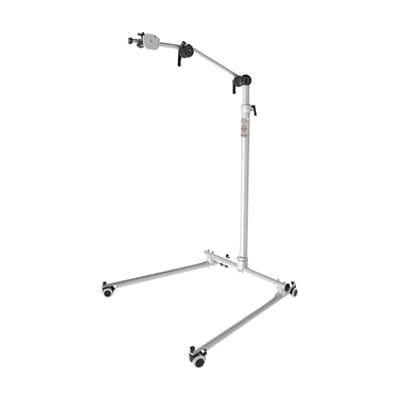
REHAdapt Floor Stand
by REHAdapt
Price is what the vendor listed when last checked. Confirm it with the vendor before buying.
Last verified September 16, 2026 · classified April 26, 2026
What it is
Summary
AI-generated from vendor-published content · April 26, 2026
This is a heavy-duty floor stand with an integrated laptop shelf, designed to hold touch monitors, AAC devices, or other assistive technology hardware in a stable, freestanding position. It's built for situations where a wheelchair mount or table mount won't work — think bedside use, therapy rooms, or classrooms where the device needs to be positioned precisely for someone who can't reposition it themselves. The OneHand arm adjusts without tools, which matters when a therapist or caregiver needs to reposition the screen frequently throughout a session. Important: this stand requires a separate REHAdapt mounting plate to actually attach your device, so budget for that additional cost before ordering.
Quick Facts Catalog facts · auto-generated
- AT Act lending
- Medicaid waiver
- Out of pocket
- School district
- Vocational rehab
What Setup Looks Like
- With a guide
- Assemble the floor stand base and vertical pole following the included instructions.
- Purchase and attach the correct REHAdapt mounting plate (sold separately) for your specific device.
- Mount your AAC device, touch monitor, or laptop to the arm and adjust height and angle to the user's optimal access position — allow 30–60 minutes for initial positioning.
- With professional help
- An assistive technology professional (ATP) or occupational therapist (OT) should assess the user's optimal screen height, angle, and reach to set the arm position correctly for therapeutic or daily use.
- See manufacturer support resources for detailed instructions.
Getting it
Try Before You Buy
Devices like this are often available to borrow through your state's AT Act program — typically free or low-cost — so you can try it before buying or pursuing funding.
Where to Get It
This is the vendor WhatCanHelp tracks for this product — it may also be available from other retailers or a local supplier, and prices vary.
Some links may be affiliate links — WhatCanHelp may earn a small commission from purchases at no extra cost to you. More on affiliates →
As an Amazon Associate we earn from qualifying purchases.
How to Fund This
Equipment like this is often pursued through official state programs. These are common starting points — each program decides its own eligibility and what it covers, so the first step is always a phone call.
Compare & explore
Sources & fine print
Vendor facts (name, price, platforms, vendor link) sourced from REHAdapt — view on vendor site; last verified September 16, 2026.
Classification & description AI-generated from vendor-published content on April 26, 2026 · confidence: high. Vendor specs may lag; verify before relying on details in a clinical or funding artifact.