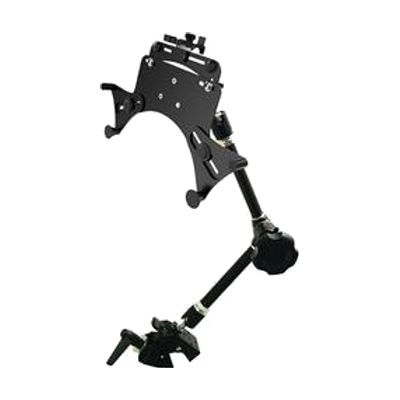
VFA with Universal Tablet Holder
Contact vendor for pricing
What it is
Summary
AI-generated from vendor-published content · October 1, 2026
This mounting system holds a tablet at the angle you need, whether it is clamped to a table edge, a tray, or a wheelchair frame. The Variable Friction Arm moves smoothly and stays where you put it, even when positioned upside down. The holder fits most tablets from 7 to 13 inches, with or without a case, including iPads and Samsung Galaxy tablets. It grips the tablet at minimal contact points, so ports and the screen stay clear. The tablet is not included, and the maker notes it cannot guarantee the safety of your tablet or case, so check the fit and tightness before relying on it.
Getting it
Try before you buy
Devices like this are often available to borrow through your state's AT Act program — typically free or low-cost — so you can try it before buying or pursuing funding.
Where to get it
This is the vendor WhatCanHelp tracks for this product — it may also be available from other retailers or a local supplier, and prices vary.
How to fund this
These are common places to ask about paying for equipment like this. Each one decides its own eligibility and what it covers, so start by asking them.
Details
Quick Facts Catalog facts · auto-generated
- Platform
- Age range
- Complexity
- Setup with instructions
- Price
- Funding
- AT Act lending
- Medicaid waiver
- Out of pocket
- School district
- Vocational rehab
What setup looks like
- Out of the box
Clip your tablet into the holder. It snaps in and comes out again when you need it. - With a guide
- Attach the clamp to a table edge or round bar, then connect the arm and tablet holder.
- Loosen or tighten the knobs and the 2.5mm Allen key adjustments until the arm moves smoothly and holds the tablet steady. Allow about 20 to 30 minutes to get the angle and position right. See manufacturer support resources for detailed instructions.
Compare & explore
Sources & fine print
Vendor facts (name, price, platforms, vendor link) sourced from Inclusive Technology — view on vendor site (opens in a new tab); last checked October 31, 2026.
Classification & description AI-generated from vendor-published content on October 1, 2026 · confidence: high. Vendor specs may lag; verify before relying on details in a clinical or funding artifact.