Micro-Speak Plus
Est. $40–$90, see price history
Typical price range, not a vendor quote. Confirm it with the vendor before buying.
What it is
Summary
AI-generated from vendor-published content · October 1, 2026
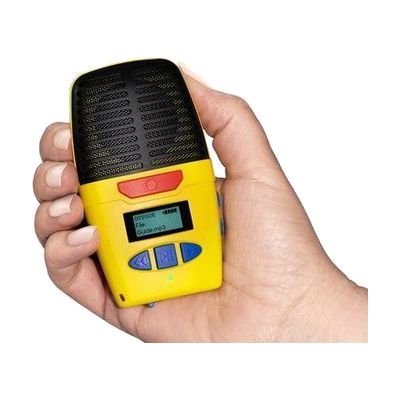
The Micro-Speak Plus is a pocket-sized digital voice recorder. You press a button to record, then play the recording back through the built-in speaker or through headphones. It has large, raised buttons you can find by touch, plus spoken prompts and on-board audio instructions, so you can use it without reading a screen. It's handy for quick notes, phone numbers, addresses, prescription instructions, lectures, or doctor visit memos. Recordings are saved as MP3 files, and it charges through a USB-C port. Headphones are not included.
Getting it
Try before you buy
Devices like this are often available to borrow through your state's AT Act program — typically free or low-cost — so you can try it before buying or pursuing funding.
Where to get it
These are the vendors WhatCanHelp tracks for this product — it may also be available from other retailers or a local supplier, and prices vary.
How to fund this
These are common places to ask about paying for equipment like this. Each one decides its own eligibility and what it covers, so start by asking them.
Details
Quick Facts Catalog facts · auto-generated
- Platform
- Age range
- Complexity
- Ready to use
- Price
- Est. $40–$90
- Funding
- AT Act lending
- Out of pocket
- School district
- Vocational rehab
What setup looks like
- Out of the box
- Charge the recorder through its USB-C port, then slide the power switch on.
- Press the record button to start a note, and press Play/Pause to hear it back.
- Use the Next and Previous buttons to move between recordings, and listen for the spoken prompts and audio instructions if you get stuck.
Compare & explore
Sources & fine print
Vendor facts (name, price, platforms, vendor link) sourced from Inclusive Technology — view on vendor site (opens in a new tab); last checked November 4, 2026.
Classification & description AI-generated from vendor-published content on October 1, 2026 · confidence: high. Vendor specs may lag; verify before relying on details in a clinical or funding artifact.