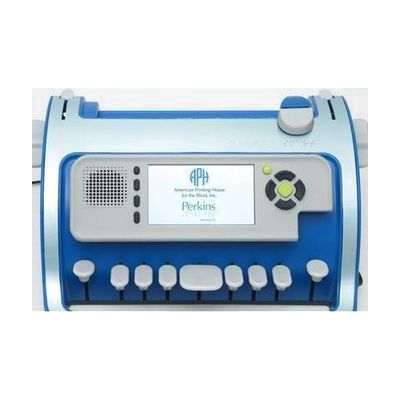
APH SMART Brailler by Perkins
by American Printing House for the Blind
Last verified June 15, 2026 · classified May 23, 2026
What it is
Summary
AI-generated from vendor-published content · May 23, 2026
The APH SMART Brailler is a Perkins-style mechanical brailler — six keys plus a space bar — built around a 4-inch color screen and built-in speaker that give instant visual and audio feedback as keys are pressed. It shows SimBraille (dot patterns) alongside print text on screen, so a sighted teacher or parent sitting alongside a child can follow along without knowing braille themselves. That combination makes it genuinely useful for peer learning and classroom settings, not just solo practice. This is a complete standalone device — no tablet or computer required — but it's purpose-built for learning braille, not production writing, so users who need a primary braille writer for everyday documents will eventually want a separate tool. At this price point it's a significant investment, and funding through school districts or state vision programs is worth pursuing before purchasing out of pocket.
Quick Facts Catalog facts · auto-generated
- AT Act lending
- Out of pocket
- School district
- Vocational rehab
What Setup Looks Like
- Out of the box
- Power on the device and begin pressing braille keys — audio and visual feedback activates immediately.
- Paper can be inserted for physical braille embossing just as with a standard Perkins brailler.
- With a guide
- Review the APH user guide to configure speech feedback language and volume settings.
- A teacher or TVI can walk through the SimBraille and large-print display modes to tailor feedback for a specific learner — expect 30–60 minutes for initial configuration. See manufacturer support resources for detailed instructions.
- With professional help
- A Teacher of the Visually Impaired (TVI) or O&M specialist should assess whether this device fits the learner's current braille literacy goals and IEP objectives.
- Integration into a structured braille curriculum typically requires coordination with a TVI over multiple sessions.
Getting it
Try Before You Buy
Devices like this are often available to borrow through your state's AT Act program — typically free or low-cost — so you can try it before buying or pursuing funding.
Where to Get It
Some links may be affiliate links — WhatCanHelp may earn a small commission from purchases at no extra cost to you. More on affiliates →
How to Fund This
Equipment like this is often pursued through official state programs. These are common starting points — each program decides its own eligibility and what it covers, so the first step is always a phone call.
Compare & explore
Sources & fine print
Vendor facts (name, price, platforms, vendor link) sourced from American Printing House for the Blind — view on vendor site; last verified June 15, 2026.
Classification & description AI-generated from vendor-published content on May 23, 2026 · confidence: high. Vendor specs may lag; verify before relying on details in a clinical or funding artifact.